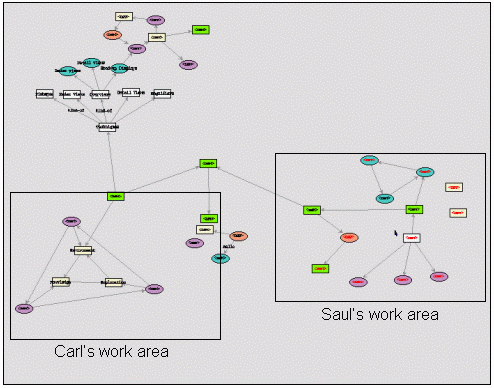
Figure 1a: The entire workspace
Carl Gutwin Department of Computer Science |
Saul Greenberg Department of Computer Science |
Users of synchronous groupware systems act both as individuals and as members of a group, and designers must try to support both roles. However, the requirements of individuals and groups often conflict, forcing designers to support one at the expense of the other. The tradeoff is particularly evident in the design of interaction techniques for shared workspaces. Individuals demand powerful and flexible means for interacting with the workspace and its artifacts, while groups require information about each other to maintain awareness. Although these conflicting requirements present real problems to designers, the tension can be reduced in some cases. We consider the tradeoff in three areas of groupware design: workspace navigation, artifact manipulation, and view representation. We show techniques such as multiple viewports, process feedthrough, action indicators, and view translations that support the needs of both individuals and groups.
Keywords: Groupware design and usability, workspace awareness
Many kinds of collaborative work involve both individual and shared activity (eg. [4,6,17]). In these mixed-focus situations, people frequently move back and forth between individual tasks performed in relative isolation and shared work undertaken with other members of the group. Even when working apart, though, people maintain a sense of the whereabouts and activities of the rest of the group. For example, when a group of people get together to plan a project, we might see people working individually on different sections, but keeping an eye on what the rest of the group is doing, and then joining one or more others to confer, coordinate, or give feedback.
When mixed-focus collaboration is to happen through synchronous distributed groupware, both the individual tasks and the shared activity present design requirements to the creator of the system. Unfortunately, these two sets of requirements often contradict or compete with one another [1,6,22]. Designs that are good for individual work often hinder group work, and designs that support the group often restrict the individual's interaction with the application. Groupware designers are left with a tradeoff between meeting the needs of individuals and meeting the needs of the group as a whole.
This tradeoff becomes particularly apparent as designers try to satisfy two design goals: support for individual control over the application, and support for workspace awareness—the up-to-the-moment understanding of how other people are interacting with a shared workspace [10,11,12]. Three situations illustrate the tension between these goals and serve as case studies in design: workspace navigation, artifact manipulation, and view representation.
Workspace navigation. Who should control where people move, the individual or the group? In single-user software, people move freely around the workspace to look at and manipulate the work artifacts that they need for their tasks. In group activity, however, collaboration is simplified when people see the same artifacts at the same time. This is a long-standing issue in groupware design: previous groupware systems have generally favoured either the group (through strict WYSIWIS view sharing), or the individual (through relaxed-WYSIWIS sharing).
Artifact manipulation. Should manipulation techniques be designed to increase an individual’s power and capability, or to provide the group with information about what is happening? The powerful interaction techniques of single-user systems often involve symbolic commands and indirect manipulation, which give little information to others about the author of the action, its occurrence, or its progress.
View representation. Should groupware systems allow each person to change the way in which the workspace is represented? Different representations can simplify individual work, but can greatly complicate communication between group members.
In each of these situations, designers can choose to favour one side or the other. The ideal solution, however, would be to find a way around the tradeoff, and support both the needs of individuals and the needs of groups. Our goal in this paper is to explore the tradeoff in each of these three situations and present interface techniques that reduce the tension between individuals and groups.
Although ideal solutions are difficult to achieve, we have identified a set of techniques that provide individual users with flexible control and powerful interaction, while at the same time providing the rest of the group with workspace awareness information. In the next few sections, we explore the situations introduced above as case studies of design tradeoffs. We discuss ways of negotiating the problem and provide example solutions from systems we have built using GroupKit [16]. Before turning to these case studies, we look at the origins of the problem in more detail.
2 The Roots of the ProblemThe tradeoff between individuals and groups is much more of an issue in groupware environments than it is in the physical world. In physical workspaces, the tradeoff is fixed by the properties of the environment—and fixed in such a way that groups can easily maintain awareness of one another. People have become used to the constraints of physical workspaces, and work practices have evolved to take advantage of them. Groupware workspaces, in contrast, are synthetic environments that do not have a fixed set of constraints. Designers must make explicit decisions about every aspect of the environment, from the way that things will look to the ways that users will interact with them. Because these decisions must be made, groupware designers must consider who will benefit and who will suffer from each choice.
There are three areas in particular where groupware workspaces differ from their physical counterparts. These differences stem both from the freedom described above and from the limitations imposed by current groupware input and display technology.
When a small group collaborates in a physical workspace, such as a tabletop or a whiteboard, people can see the entire workspace and everyone in it. Even when they are working on individual tasks, people can see others as they move and work. People interact with physical artifacts by directly manipulating them, which provides others with a great deal of information about the nature and progress of the activity. Physical workspaces also present a consistent representation of the artifacts to everyone in the group—that is, although perspectives may differ, everyone sees the same objects represented in the same way.
In computational workspaces, display resources are markedly reduced, and the flexibility of input devices is considerably less. However, there are fewer restrictions on interaction than there are in the real world. In fact, many single-user systems have mitigated the display and input shortcomings of computer environments by providing a wide range of powerful interaction techniques that would be impossible in the real world.
Each of these differences between physical and virtual environments creates tension between individual and group needs. The next three sections describe our specific encounters with the tradeoff in the areas mentioned above, and some of our solutions.
3 Workspace Navigation: Freedom To MoveGroupware display devices are much smaller and offer much lower resolution than the normal human field of view. As a result, only a small part of the workspace is visible at a time, forcing people to look and work through a small viewport. This display constraint raises the following problem: when only a portion of the workspace can be seen at once, whose needs (the individual’s or the group’s) should be considered when deciding what to show?
There are two competing requirements. Group activity is simplified when collaborators can see the same part of the workspace, since they can see others’ actions and the objects they are working on. Individuals, however, need to move around the workspace independently to see and manipulate the objects they need for their specific tasks.
In the past, synchronous groupware has favoured either groups or individuals. Early systems imposed "what you see is what I see" (WYSIWIS) view sharing (eg. [22]), where all participants’ viewports looked at exactly the same part of the workspace. This approach ensures that people can stay aware of one another’s activities, but is too restrictive for mixed-focus collaboration. Other systems implement relaxed-WYSIWIS view sharing, allowing people to navigate independently (eg. [23]). Unfortunately, when people look at different areas of the workspace, they are effectively blinded to the actions and events that go on outside their viewport, making the maintenance of awareness far more difficult.
The ideal solution would be to support both needs—show everyone the same objects, as in WYSIWIS systems, but also let people move freely around the workspace, as in relaxed-WYSIWIS groupware. One approach that makes this possible involves splitting the view of workspace into two viewports. The main viewport is under the control of the local user, and the smaller secondary viewport shows a different perspective on the workspace and provides workspace awareness information.
In earlier work (eg. [10,11,13]) we have introduced two types of secondary displays, overviews and detail views, that follow this approach. Overviews show the entire workspace in miniature, and show objects as they move or change. When the overview also displays each person’s telepointer and the extents of their main view, we call it a radar view [21] (Figure 1c). Radar views make people’s presence, location, and activities visible, regardless of where they are in the workspace. Detail views are secondary viewports that show more detail of another person’s activity, but show less of the workspace than an overview. Detail views can show any part of the workspace, but we consider two configurations to be most applicable: the "over the shoulder view" (Figure 1d) and the "cursor’s-eye view" (Figure 1e). These secondary views are described below and are illustrated in Figure 1.
Figure 1a: The entire workspace
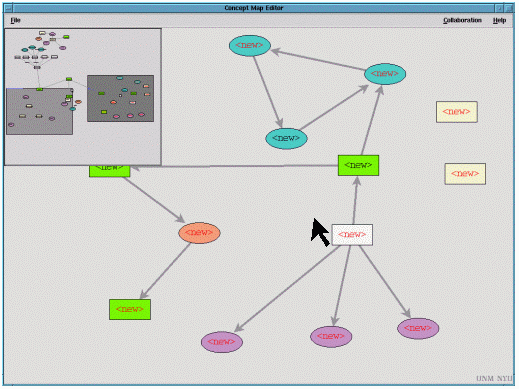
Figure 1b: Saul's interface with main view and secondary view
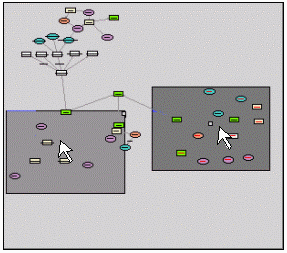 Figure 1c: The radar view |
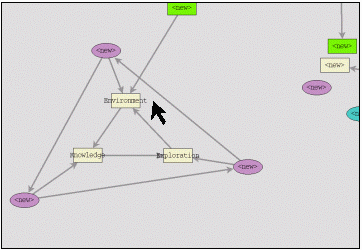 Figure 1d: Over-the-shoulder view of Carl's area |
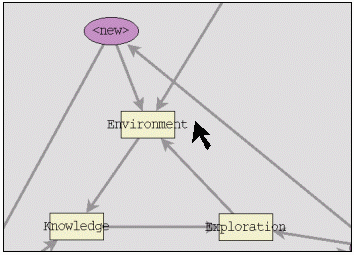
Figure 1e: Cursor's-eye view around Carl's cursor
Figure 1. Secondary viewports on the workspace.
To begin with, Figure 1a shows the entire workspace of a groupware concept-map editor. In this example, there are two people in the workspace: Carl is working at the left side of the workspace, and Saul is working at the right side. Figure 1b shows the application interface on Saul’s screen, containing a main view and a secondary view. The main view shows the workspace at full size, and allows independent navigation. In the top left corner of Saul’s main view (Figure 1b) is an inset radar view. The radar view is also shown separately in Figure 1c. The radar view shows each person’s main view extents as a filled rectangle, and shows a miniature telepointer for each person. Although Saul can move freely, the radar view provides him with immediate information about Carl’s location and activities.
The radar view in Saul’s main view could be replaced by, or used together with, one of two detail views. First, an "over-the-shoulder" view shows a reduced version of another person’s main view. The objects are shown smaller than full size, but are considerably larger than they would be in an overview. Figure 1d shows an over-the-shoulder view of Carl’s work area. By adding this view to his interface, Saul can keep track of exactly what Carl can see. Second, a "cursor’s-eye" view shows a small area directly around another person’s mouse cursor. Although its extents are limited, the cursor’s-eye view shows objects and actions in full size and full detail. A cursor’s-eye view of Carl’s cursor is shown in Figure 1e.
Tradeoff issues in workspace navigationThe use of secondary viewports allows individuals to move freely around the workspace, while still providing information about others’ whereabouts and activities. Overviews and detail views release designers from the bind of having to give navigation control to either the group or the individual. However, this approach does not make the tradeoff go away, but simply shifts it to the window level rather than the application level. Designers must now trade off the amount of screen space allocated to the individual and group windows.
Nevertheless, it is now at least possible to form a compromise, and these compromises can be based on the specific needs of the task. Designing a usable system thus implies knowing what kinds of awareness information are important to the group activity, and how much detail about others’ actions is needed to maintain awareness.
For example, the radar view in Figure 1b shows general locations and conveys basic actions and gestures, but takes up only a small amount of screen space. In previous evaluations of collaborative construction tasks (eg. [9,14]), overviews that used about an eighth of the main view were found to be valuable additions to the system, and a good use of screen space.
We have not evaluated detail views to the same extent, but it is clear that they would be used when awareness requirements are much more specific. Since they can only show information about one other person, multiple displays would be required for groups larger than two. This requires more screen space than an overview, reducing the allocation to the local user’s individual tasks. Other visualization techniques, such as transparent overlays, could mitigate this problem (eg. [2]).
In sum, secondary views provide designers with finer-grained control over the tradeoff between individuals and groups. They translate the design question from ‘who controls the whole interface’ to ‘how much of the interface is controlled by each party.’ Knowledge of the awareness requirements in the collaborative task can provide insight into how to make a satisfactory compromise.
In the next section, we turn from the tradeoffs in navigation to those that arise from the design of manipulation techniques. At issue are the ways that people interact with workspace artifacts, and the ways that others in the group perceive those interactions.
4 Symbolic Manipulation: Making Actions More PerceivableThe manipulation techniques that a designer puts into a groupware system also introduce a tradeoff between individuals and groups. Techniques for manipulating objects often support either individual tasks or workspace awareness, but not both. Two aspects of these techniques are particularly important: the amount of power they provide the user, and their degree of visibility to the rest of the group. Unfortunately, these attributes are often related—more power for the user often also means less visual information about the action. Since the information produced by an action greatly assists others in maintaining workspace awareness, the groupware designer faces a problem: should manipulation techniques be designed to aid the individual or the group?
Before discussing solutions to the problem, we explain further what it means for an action to generate information. To begin with, consider manipulation in physical workspaces. In this environment, people act on objects through direct manipulation, which produces two kinds of information: consequential communication and feedthrough.
In consequential communication [19], the characteristic movements of an action communicate its character and content to others. For example, when a pilot reaches over and lowers the landing-gear lever, the action "not only controls the landing gear, but just as important, it acts as a natural communication between the two pilots, letting both know the action has been done. ([15], p. 142)
In feedthrough [3], the feedback produced when artifacts are manipulated provides others with clues about that manipulation. For example, when one pilot sees the landing-gear lever move, they can conclude that their partner is moving it, even when they cannot see the other pilot. Feedthrough is also commonly associated with auditory feedback: the sound of the landing-gear lever indicates what the other pilot is doing, just as the visual information does.
Unlike the physical world, interaction with computational environments is not limited to direct manipulation. In a computational workspace, the visibility of an action and the effort it requires depend entirely on the design of the system. At one end of the spectrum, (virtual) direct manipulation techniques simulate real-world interaction. They emphasise visibility, incremental action, and immediate and continuous feedback (eg. [20]). For example, dragging a file across the screen in order to change its parent directory is a direct-manipulation action. As in the real world, these techniques produce consequential communication and feedthrough, giving others in the group information about the action.
At the other extreme, symbolic manipulation techniques are commands that let users specify actions in powerful and flexible ways. They are shortcuts that emphasize rapid invocation and minimal feedback. Menu commands, buttons, toolbars, and keyboard shortcuts are examples of symbolic manipulation techniques. Symbolic manipulation lets users interact with artifacts in ways that are often not possible in the real world. While a good idea in single user systems, they produce almost no consequential communication, and their minimal feedback can drastically reduce people’s ability to maintain awareness. Therein lies the designer’s problem.
In addressing this situation, we start from the assumption that symbolic manipulation is here to stay—it is simply too useful to the individual. People who are used to these techniques would be unlikely to accept an increase in effort just to benefit the group. Our efforts, therefore, have been in considering how symbolic commands and indirect manipulation might be augmented to provide more information to the group.
Symbolic manipulation techniques have four drawbacks for group members trying to stay aware of one another.
The problems can be addressed, however, by transforming the minimal information provided by these actions to a more visible form. This is the approach suggested by Segal [19]: "compensate for consequential information that is lost…by providing enhanced feedback from the system indicating what specific actions each operator is performing" (p. 411). Below, we discuss two approaches—process feedthrough and action indicators—that can make symbolic manipulation more obvious, more distinguishable, and more interpretable to others.
Process feedthroughSome symbolic commands are invoked through interface widgets such as buttons, menus, or dialog boxes. These interfaces provide the local user with visual reminders of what can be done, as well as feedback indicating the action that is being composed. For example, buttons depress under a mouse click, and menus highlight the command currently underneath the cursor. Other users in a groupware system rarely see this feedback, for two reasons: first, it is considered to be part of the application rather than part of the workspace, and second, it is considered to be distracting to other users. Feedback from these interfaces, however, can help the group to determine what actions people are composing. When other people receive this information, it becomes process feedthrough.
As a simple example of process feedthrough, consider a button in the interface of a groupware application. When a person’s cursor moves over the button, it becomes highlighted on all user’s screens; when a person presses the button, it is shown being pressed on all screens. The highlight and the press give people a chance to interpret the action and determine what the other person is doing. If the button represents a particularly important action, the natural feedthrough can even be augmented to make it more visible. For example, the button could make a clicking sound when it is pressed, or use a more obvious highlight colour.
A second example involves process feedthrough for menus. Menus are a more complicated case than buttons, since they carry a greater risk of distracting others or even obscuring their work. To reduce this risk, we display only a portion of the feedback information that is visible to the local user. Figure 2 shows a group-visible popup menu as it appears on a local and a remote display. The menu can be shown in several different ways on other user’s screens, each providing a different amount of process feedthrough. The first variant (Figure 2, right) shows the extents of the menu as an empty rectangle, and shows only the item that the remote user’s mouse is currently over. This version is useful when a large menu would hide too much of the local user’s view. The second variant (not shown) provides only minimal information. It does not show intermediate selections, but only the menu outline, and once the user has made a choice, what item was chosen.
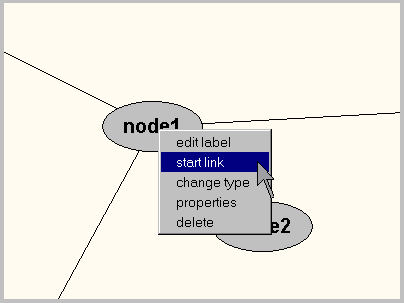
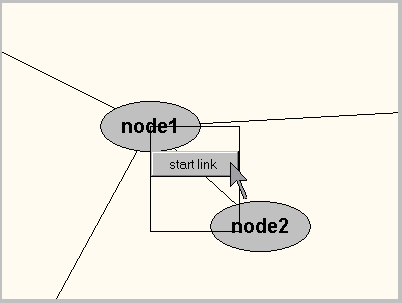
Figure 2. A remotely visible popup menu, as it is seen locally (left) and remotely (right).
This technique can also be used with other kinds of symbolic commands. Figure 3 illustrates a group-visible dialog box used to change the properties of a workspace artifact. Again, reproducing the entire dialog on all screens would cause too much disruption, but we can provide a summary representation (Figure 3 right) that conveys the current state of activity.
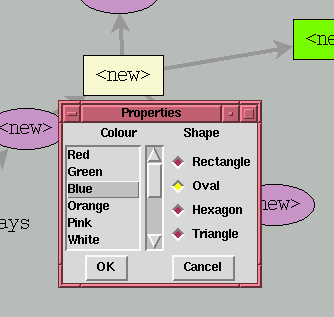
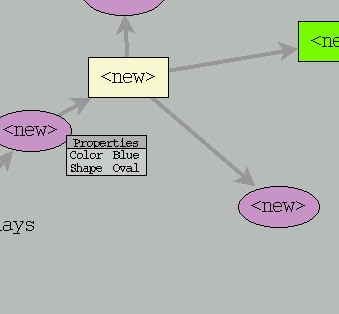
Figure 3. A group-visible dialog box, as seen locally (left) and remotely (right).
Providing process feedthrough shows how actions are being composed and invoked, but does not make the action itself more noticeable. When actions are hard to see, they can be augmented with artificial indicators, an approach we discuss next.
Symbolic actions happen quickly and abruptly, making them hard to see and hard to interpret. For example, when someone presses the ‘delete’ key to remove a selected object, the operation is nearly instantaneous. In addition, since a keypress provides no process feedthrough, other users have little warning that the deletion is about to happen. When actions are invisible, our approach is to create an artificial signal for them; these signals (called action indicators) can be given a more perceivable workspace representation. Action indicators differ from process feedthrough in that they are tied to the action itself rather than to the process of selecting a command.
A deletion operation can be indicated in several ways. A simple solution is shown in Figure 4. When a node in this concept-map application is deleted using a keyboard command, the application draws a text flag on remote screens and displays it for a moment before removing the object. This technique gives the rest of the group information and time to interpret the sudden disappearance of the object from the workspace.
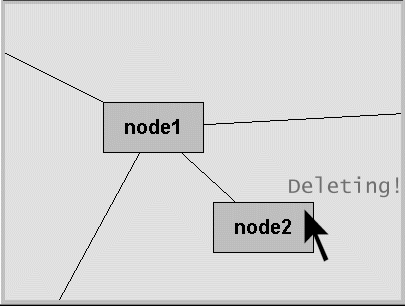
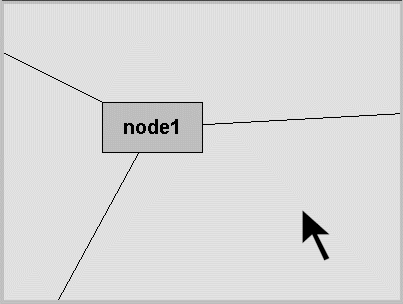
Figure 4. Symbolic delete indicator, during and after delete.
Although this solution is an improvement over no action representation, it still has a fairly high interpretation cost. A remote user has to see and read the indicator, and if several actions are represented the same way, distinguishing between them may still be a problem.
An alternate approach that can mitigate these problems is to have the artifact itself animate the action. When actions cause a visible change in the artifact, these changes can be made more perceptible even if the action is invisible. Figure 5 shows this approach in a concept-map system. When a node is deleted, it does not simply disappear, but swells up for a moment before gradually fading away (the supernova effect). Although the original delete action is still invisible, the effects of that action have been drawn out and made more noticeable.
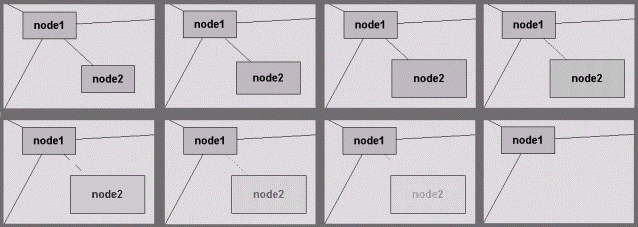
Figure 5. "Supernova" animation of a delete action.
The idea of animating actions builds on the observation of Ellis, Gibbs, and Rein [5] that others’ actions are inherently more difficult to interpret than your own, so smooth animation of changes can aid interpretation. The extra step that we take is in inventing characteristic behaviours for the purpose of indicating action.
A final indication technique uses sound cues to indicate actions. Sound has the advantage of being perceptible even when the object is off-screen, and can be combined with the visual approaches described above. Different sounds can indicate different types of action, and can even convey characteristics and progress of the action (eg. [6,7]). For example, the system shown in Figure 5 plays a descending "whoosh" sound that fades away along with the visual representation of the deleted node.
Tradeoff issues in making actions perceivableProcess feedback shows people’s actions as they invoke a symbolic command, and action indicators emphasize or embellish what happens after a command is executed. Either way, the idea is to draw out the action, make it more perceivable, and differentiate it from other actions. This approach allows the designer to provide symbolic manipulation techniques while still helping groups maintain awareness. However, as in the previous situation, these techniques introduce new decisions that the designer must balance in order to create a usable system.
Making actions more perceivable aids the maintenance of awareness, but as more visual information is displayed on the screen and more auditory information is played, the risk of distracting the individual increases. The question for the designer becomes one of making demands on people’s attention: how much attention should people pay to the activities of the group, and how much should they pay to their individual activities? In past systems, the balance has been in favour of the individual, but it could clearly be swung too far to the side of the group as well.
As the above techniques show, the designer can control the way process and action are presented, and they can tailor this presentation to the demands of the task. It is clear that not all events can be shown just as they appear on the local user’s screen; some large actions must be made smaller, and some small actions must be made larger. It may also be wise to give the user some control over these presentations, so that they can in essence say: "leave me alone, I’m trying to concentrate."
5 View Representations: Pointing At ThingsA third example of the tradeoff between individual and group needs involves the way the workspace and its artifacts are displayed on each person’s screen. Groupware systems can display objects in different ways: for example, Figure 6 shows how a system might represent a hierarchy of objects as a tree or as an outline. Providing different representations can make individual tasks easier, but can also greatly restrict communication about the objects in the workspace. The designer must decide whether to assist individuals by allowing multiple representations, or to assist groups by restricting the workspace to a single consistent representation.
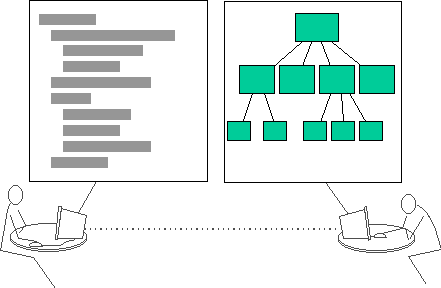
Figure 6. Representational differences in views
This problem does not occur in physical workspaces, where the appearance of an object is determined by its physical properties. In a groupware workspace, however, each person could change the way things look to suit their individual tasks and tastes. Individual tasks may benefit from different representations of the workspace that highlight particular aspects of the data or allow certain kinds of operations. Workspace awareness, however, is easier to maintain when people have a common representation.
We focus on two kinds of activity that are particularly important in collaboration: gestural communication and deictic reference. Both of these activities are ubiquitous in shared workspaces (eg. [19,24,25]). Deixis and gesture can only be interpreted correctly when they are seen in context—that is, when their relationships to the surrounding area of the workspace and nearby objects can be determined. With only one common representation of the workspace, this context is preserved for all the members of the group. As representations diverge, however, the surrounding context is quickly lost.
For example, consider the system shown above in Figure 6, where one person views a hierarchy as an indented text outline, and another person views it as a graphical tree. If one user circles a leaf node in the text view with their cursor, the gesture will be impossible to interpret in the tree view, since the corresponding leaves are different sizes and shapes, and are in different screen locations. Similarly, the path along which the cursor is moved in the tree view has no meaningful analogue in the text view. Before considering whether these problems can be solved, we look at two simpler cases where representational differences are smaller.
The first case involves a concept-map editor that uses a fisheye view to represent the workspace (Figure 7). The fisheye distorts the spatial representation based on a focus point and a distortion factor [18]. However, in a relaxed-representation groupware system, each user can set their own focus point and level of distortion. When two fisheye views differ, telepointers no longer map to the correct locations in others’ windows.
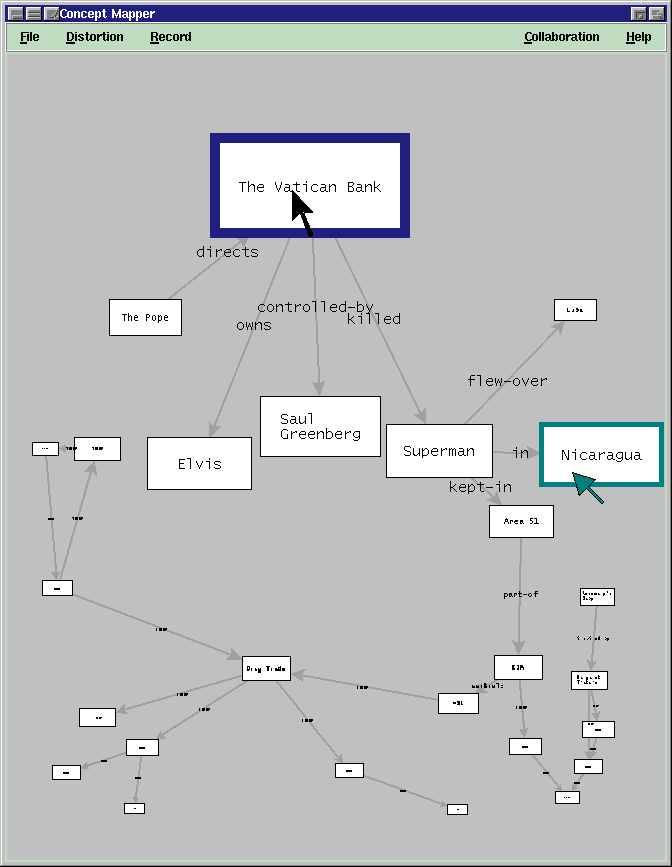
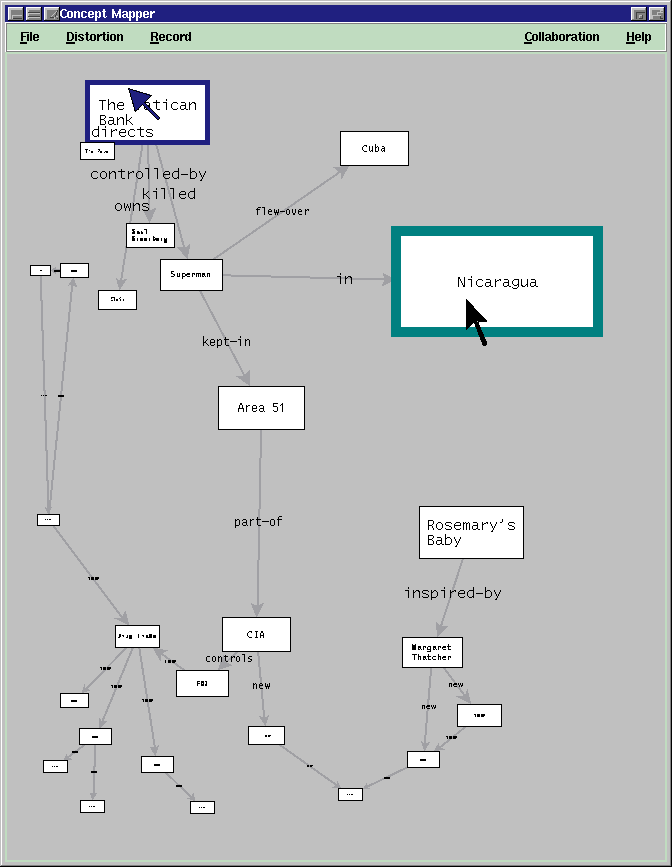
Figure 7. Different fisheye representations of a concept-map workspace.
This problem can be solved easily, since the two representations are related by a mathematical transformation. Telepointers can be placed in the correct location relative to the underlying workspace objects by determining the transformation from one fisheye function to the other. In Figure 7, each cursor and its corresponding telepointer are in different screen locations, but in the same workspace location.
The second case introduces a larger disparity between views. Figure 8 shows two people’s views of a shared web browser, where each person is using a different font. The font sizes cause lines to wrap differently on the two displays. Once again, if a telepointer simply tracks the screen location of a remote user’s cursor, it will point at the wrong part of the text. In this case, there is no mathematical transformation relating the two views.
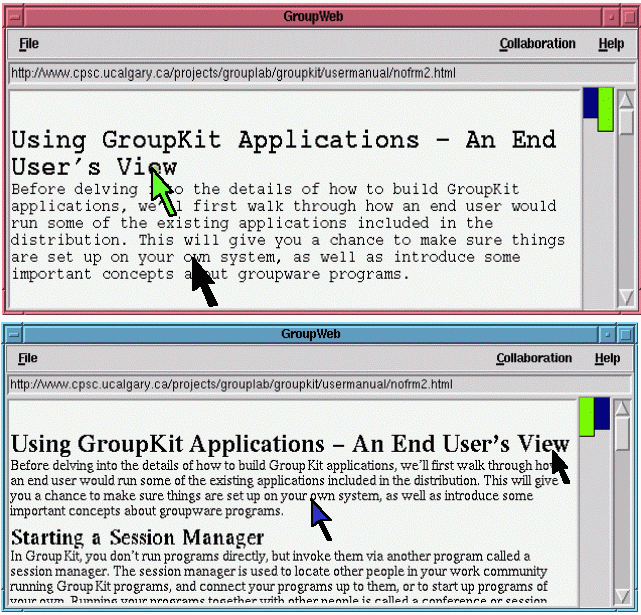
Figure 8. Two representations of a document in a shared web browser.
However, gestures can be put into their proper context by attaching the telepointer to the text location of the cursor rather than the screen location [8]. Movement is thus tied to the underlying representation, which is structurally equivalent in both views.
These two cases provide strategies for conveying workspace awareness information (gestures and deictic references) even when representations differ. However, both cases involve relatively minor differences, and neither of the solutions work particularly well in the initial scenario of the system with a tree view and a text view (Figure 6). Cursor movement in this system could be tied to the common underlying structure, as described above. However, the granularity of the objects in the workspace is much coarser than in the web browser, and therefore only a broad indication of motion could be conveyed. This strategy would allow rudimentary pointing and deictic reference, but would not show gestures in enough detail. In addition, people would have to learn how to point ‘properly’ in this system, so that their actions could be correctly interpreted by others.
Tradeoff issues in view representationView representation presents designers with more problems than do either of the previous two situations. Although we have found techniques for translating gestures across small differences in representation, larger disparities allow only crude solutions. It may be that meaningful discussions about objects in the workspace will require users to converge their views on a single common representation.
If this is the case, then knowing what representation others are using becomes useful knowledge, since initiating a conversation may only prove successful when views are similar. The over-the-shoulder display illustrated above in Figure 1d, which shows exactly what another person can see and how they see it, could be valuable for keeping track of view differences.
Finally, we have focused on gestural communication, but divergent representations also affect other kinds of activity. In particular, direct manipulation techniques lose their ability to convey information when representations diverge, since both feedthrough and consequential communication depend on workspace context for interpretation. Oddly, symbolic manipulation can provide better support for workspace awareness than direct manipulation in these cases, since the techniques introduced in the previous section (process feedthrough and action indicators) can be used regardless of representation.
6. DiscussionThe main conclusion of this research is that the needs of both individuals and groups can be met in groupware interfaces. In the three situations we considered, we found that:
This success, however, must be received with two caveats. First, avoiding the tradeoff at one level often just moves it to a different level, albeit one that is more manageable. Second, the tradeoff appears in many guises in a groupware interface, and different situations allow different amounts of success in supporting both roles.
There are several other general issues underlying the tradeoff that require further thought. We consider four of these here: the importance of understanding the collaborative situation, the ways in which new technology can mitigate the tradeoff, the extra demands placed on the designer, and the difficulty of removing the tradeoff entirely.
Issue 1: Understanding collaborationThe designer’s goal is to provide appropriate techniques for navigating, manipulating, and viewing the workspace. As the solutions above indicate, this goal is aided by knowing what information people require for effective collaboration, and how they gather that information from the environment. Unfortunately, there is not a great deal known about how people use environmental information when they work together. Furthermore, this knowledge is difficult to obtain. As Norman [15] says, "natural interaction is often invisible, unnoticed interaction…the problem is, it isn’t always obvious just which parts [of the environment] are critical to the social, distributed nature of the task, [and] which are irrelevant or detrimental" (p. 145). In our work, concentrating on the information that people need to maintain awareness has provided insight into new designs for interaction techniques [10]. Other analyses of collaborative situations will undoubtedly provide additional kinds of useful design knowledge.
Issue 2: The mixed blessing of improved technologyNew and improved input and display devices will help designers avoid the tradeoff in some situations, but not in others. This is because only some of the design tensions between individuals and groups are caused by the limits of groupware technology—others are caused by the freedom designers have to invent interaction techniques that are impossible in the real world. For example, a system with a table-sized display would better approximate the large visual field of a physical workspace, and would reduce the problem of navigation control. However, large displays will do nothing to improve the perceptibility of actions, and will not help in translating between view representations. In fact, new technology will likely lead to even more powerful symbolic manipulation techniques and more flexible ways of changing representations. These new techniques will further complicate the designer’s task of providing awareness information to the group.
Issue 3: Extra demands on the designerManagement of the tradeoff requires considerable additional work for the groupware designer. To produce an application that supports people both as individual users and as a group, the designer must investigate awareness requirements of the work situation, assess the capacities for feedthrough and consequential communication of each interaction technique and artifact representation, and augment the system using approaches like those described above. These tasks add to the complexity of a groupware system and to the time needed to design and build one. To mitigate this problem, software components should be made available to designers that support these groupware-specific needs. For example, we have added devices such as the radar view and the group-visible menu to the GroupKit toolkit [16], but much more could be done.
Issue 4: The difficulty of removing the tradeoff entirelyAlthough the solutions described above do successfully manage the tradeoff, they are imperfect in many ways. For example, radar views are small and provide limited resolution for perceiving actions and events; animations occur after the action itself has happened; and transformations of actions from one representation to another can end up looking clumsy. In some cases, further design and evaluation work on these devices will improve their usability, but in others we are left with few options, forcing us to accept an information environment that is better than the status quo but not as good as we would like.
7 ConclusionWe have explored a persistent problem in the design of synchronous groupware systems—the competing requirements of users as individuals and as members of a group. We examined the tradeoff as it applies to individual power and to the maintenance of workspace awareness. In three kinds of situations (workspace navigation, interaction with artifacts, and view representation), we described approaches that let a designer manage the tradeoff and support both individuals and groups. These approaches provide designers with an initial set of tools, but additional work on the issues underlying the tradeoff remains to be done. These efforts will move us closer to the goal of groupware that is flexible and powerful for the individual, and that also allows groups to interact smoothly and efficiently.
Thanks to Steve Jones and Mark Apperley for comments and discussions on these ideas. Thanks to Intel corporation and NSERC for support in carrying out this research.