Carl Gutwin |
Saul Greenberg |
Real-time collaboration in current groupware workspaces is often an awkward and clumsy process. We hypothesize that better support for workspace awareness—the understanding of who is in the workspace, where they are working, and what they are doing—can improve the usability of these shared computational workspaces. We conducted an experiment that compared people’s performance on two versions of a groupware interface. The interfaces used workspace miniatures to provide different levels of support for workspace awareness. The basic miniature showed information only about the local user, and the enhanced miniature showed the location and activity of other people in the workspace as well. We examined five aspects of groupware usability: task completion times, communication efficiency, the participants’ perceived effort, overall preference, and strategy use. In two of three task types tested, completion times were lower in the awareness-enhanced system, and in one task type, communication was more efficient. The additional awareness information also allowed people to use different and more effective strategies to complete the tasks. Participants greatly preferred the awareness-enhanced system. The study provides empirical evidence that support for workspace awareness improves the usability of groupware, and also uncovers some of the reasons underlying this improvement.
Real-time distributed groupware allows people to work together at the same time from different places (e.g. Baecker 1993; Greenberg 1991). Many of these systems provide shared computational workspaces— two-dimensional areas akin to whiteboards or tabletops— where people can create and manipulate task artifacts. Although many of the technical problems of constructing these systems have been solved, their usability problems have not yet been eliminated. Collaboration in groupware workspaces is often awkward, stilted, and frustrating compared to collaboration in face-to-face settings. The difficulty is particularly acute when the workspace is larger than the screen and people navigate independently through the workspace—called relaxed-WYSIWIS view sharing (Stefik et al. 1987).
Part of the problem with current systems is that they don’t provide much information about other participants in the session. When people work together in a face-to-face setting, a wide variety of perceptual cues help them keep track of what others are doing. This awareness of others in the workspace is workspace awareness, the up–to–the–moment understanding of another person’s interaction with the shared space (Gutwin 1997; Gutwin and Greenberg 1996). At a simple level, it involves knowledge of who is present, where they are working, and what they are doing. Workspace awareness is used in collaboration to coordinate activity, to simplify verbal communication, to provide appropriate assistance, and to manage movement between individual and shared work.
We believe that being able to maintain workspace awareness is necessary for natural and smooth collaboration in a shared workspace. Current groupware systems, however, provide only a fraction of the information needed to maintain workspace awareness. Consequently, we hypothesize that increased support for workspace awareness will improve the usability of real-time distributed groupware. Our goal in this article is to evaluate that hypothesis, and in what follows we describe a study that we carried out to assess the effects of workspace awareness support on a realistic groupware system.
A previous study provided qualitative evidence that awareness support is valuable (Gutwin, Greenberg, and Roseman 1996). It also showed that workspace miniatures—miniature representations of the entire workspace—are useful vehicles for this information. Building on these results, the current study focused on the quantitative effects of awareness support on groupware usability. We compared two groupware interfaces that provide different amounts of awareness information through their workspace miniatures. In particular, we compared a basic miniature to one that adds three kinds of information:
The awareness-enhanced version of the miniature is called the radar view, a device first seen in the SharedARK system (Smith 1989; Smith et al. 1992). Our experiment measured three general aspects of groupware usability: how well groups perform with each interface, the efficiency of their collaboration, and the group’s satisfaction with the system. We also looked at the strategies that the two different groups used. The study showed significant improvements in speed and communication efficiency for some of the tasks, and showed that the radar view allowed people to use more effective strategies for completing tasks. Observations of the sessions and participant feedback provide some explanation for these results, and also indicate additional design directions. Before describing the experiment and our findings, we begin by outlining the two basic ideas underlying the research, workspace awareness and groupware usability.
It is becoming more and more apparent that being able to stay aware of others plays an important role in the fluidity and naturalness of collaboration (e.g. Dourish and Bellotti 1992; Segal 1995; Tang 1991; Gaver 1989) . We have looked closely at one kind of awareness that involves collaboration in a shared workspace. Workspace awareness is the up-to-the-moment understanding of another person’s interaction with a shared workspace (Gutwin 1997; Gutwin and Greenberg 1996). It involves several kinds of knowledge about the people in the workspace and their activities. This knowledge is useful for many of the activities of collaboration—for coordinating action, managing coupling, talking about the task, anticipating others’ actions, and finding opportunities to assist one another. Since workspace awareness information is dynamic, maintaining it entails a continuous process of gathering information from the workspace environment and integrating that information with existing knowledge.
We have built a conceptual framework of workspace awareness that sets out its component elements, mechanisms for maintaining it, and the ways that workspace awareness is used (Gutwin 1997). In the current study, we are particularly interested in the elements of workspace awareness that relate to real-time activity; these are shown in Table 1.
| Category | Element | Specific questions |
| Who | Presence | Is anyone in the workspace? |
| Identity | Who is participating? Who is that? |
|
| Authorship | Who is doing that? | |
| What | Action | What are they doing? |
| Intention | What goal is that action part of? | |
| Artifact | What object are they working on? | |
| Where | Location | Where are they working? |
| Gaze | Where are they looking? | |
| View | Where can they see? | |
| Reach | Where can they reach? |
Table 1. Elements of workspace awareness relating to real-time activity (Gutwin 1997)
When people know the answers to these questions, many of the activities of collaboration are made easier. For example, knowing where another person is working and what part of the workspace they can see allows for efficient means of communication such as deictic reference (e.g. Tatar et al 1991). Pointing to an object is much easier than indicating it though description, but deixis requires that people know what is visible to the other person. Coordination is another example. Coordinating actions with another person in a shared workspace is far simpler when both parties know what the other is doing. Workspace awareness is particularly evident in continuous activities where people work with the same objects (e.g. Tang 1991).
The awareness problem in groupware is that while it is relatively easy to answer the kinds of questions shown in Table 1, maintaining awareness is much more difficult in a distributed workspace. It is often difficult or impossible to keep track of others in a groupware system, because groupware provides only a fraction of the perceptual information that is available in a face-to-face workspace. The overall approach in our research is to recreate some of the awareness information that is missing from a groupware workspace, allowing people to gather and use it just as they do in the real world. As might be expected, there are several issues to be resolved in adding awareness information to a groupware system, such as what information to add, how to present it in the interface, and when to make it available. Although we will not discuss them here, we will note that the awareness displays used in this experiment have undergone several design revisions to address these questions (see Gutwin 1997).
Our hypothesis is that awareness support will improve groupware usability. Testing this claim implies knowing what groupware usability is, and knowing how to measure it. Since no concrete definition of groupware usability has been accepted by the CSCW community, we adapt the concept from the better-known area of ‘singleware’ usability. Usability in a single-user environment is the degree to which a system is effective, efficient, and pleasant to use, given a certain set of users and tasks (e.g. Shackel 1990; Neilsen 1992). Real-time groupware systems are subject to these criteria as well, but now two kinds of activity must be considered: taskwork and teamwork. Taskwork is the domain activity, the activity that produces things like drawings, documents, or models. A groupware system clearly must allow taskwork to proceed effectively, efficiently, and pleasantly, in order to be a good application. However, groupware must go beyond taskwork and support teamwork—the work of working together—in order to be truly usable.
Teamwork involves several activities: for example, group members must communicate, organize joint action, provide assistance, coordinate activity, divide labour, and monitor each other’s work. Each of these activities can be considered in terms of efficiency, effectiveness, and group satisfaction. Our conception of groupware usability focuses on teamwork, and we define it as the degree to which a groupware system supports the activities of collaboration. Although teamwork also involves social and affective activities, we limit our definition to those that accomplish the mechanics of collaboration: communication, coordination, planning, monitoring, and assistance.
The second issue in evaluating our hypothesis is one of measurement—how can improvements in usability be determined? Groupware is notoriously difficult to measure (e.g. Grudin 1990); the main problem is that usability, effectiveness, efficiency, and pleasance are qualities that cannot be directly observed. Other researchers, however, have found indirect measures that appear to fit well with our conception of groupware usability. In particular, Olson et al. (1992, 1995) measure three aspects of collaboration: product, process, and satisfaction.
Evaluations that consider product, process, and satisfaction aspects of groupware usability can provide a broad and balanced look at a groupware system. This is the approach that we follow in our experiment. Below, we review our methods, and discuss each of the measures we use in these three areas.
The experiment tests the hypothesis that increased workspace awareness support increases groupware usability. We compared people’s collaboration when using two groupware interfaces—each providing different amounts of awareness information through workspace miniatures. In this section we outline the groupware system used, the experimental tasks, the participants, the study design, and the measures taken.
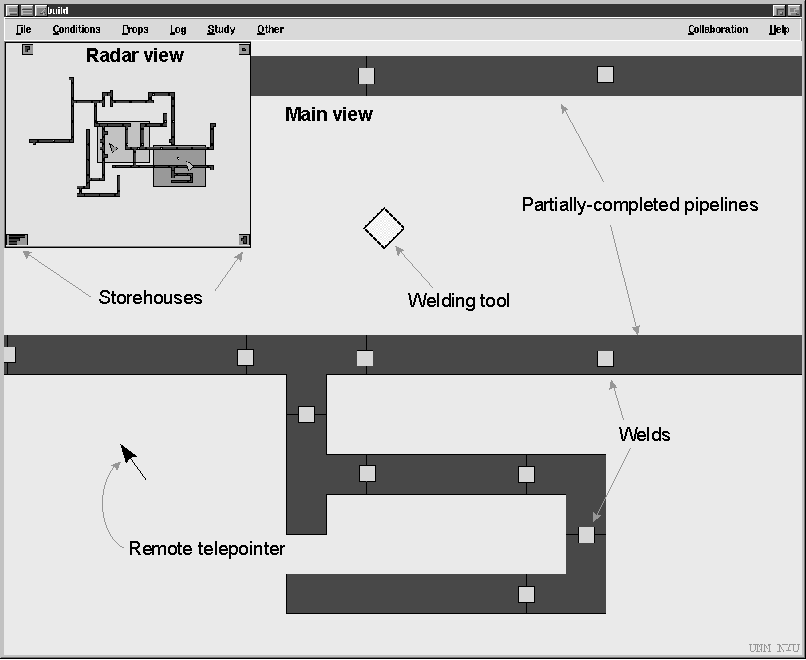
We are interested in groupware systems that allow small groups to collaborate in real time in a medium-sized visual workspace. Activities in these systems are organized around the creation, manipulation, and organization of artifacts in the workspace. We built such a system for this experiment, using the GroupKit toolkit (Roseman and Greenberg 1996) and the Pad++ drawing system (Bederson and Hollan 1994). The application was a pipeline construction kit that allows the assembly and manipulation of simple pipeline networks in a shared two-dimensional workspace (Figure 1). Users can create, move, and rotate sections of pipe, and can join or split sections using a welding tool. The workspace is rectangular, and four times larger than the computer screen in each direction. Users scroll around the workspace by dragging their cursor past the window border.
The pipeline system’s interface consists of two windows. The main view takes up most of the screen and shows objects in full size and detail. The main view allows users to manipulate objects and to scroll to other areas of the workspace. People create pipelines by dragging pipe sections from storehouses in the corners of the workspace (see Figure 1), aligning the sections, and then welding them together by dropping a diamond-shaped welding tool onto the joint. Welds are marked by a yellow square, and once pieces are welded, they move as a unit.
Figure 1. The pipeline application (radar view version)
The second window is one of two miniature views, the radar view or the overview. This view is inset into the top left corner of the main view, and shows the entire workspace in miniature. The radar view and the overview differed in three ways, as compared in Figure 2.
In sum, the two conditions differed only in the awareness information presented in the miniature. The overview only showed information about the local user, while the radar showed where the other person was located, showed their pointer, and showed moves as they occurred.
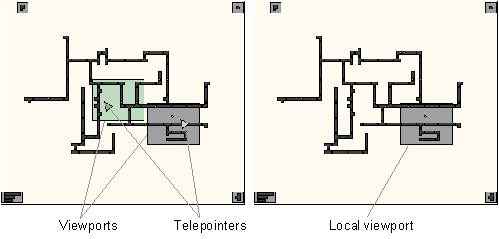
Figure 2. Radar view (left) and Overview (right).
Participants completed three different tasks. The tasks are based on joint actions common to construction tasks in shared workspaces, and require people to move independently around the workspace. Division of responsibility in the tasks is similar to Chapanis’ (1975) communication studies, where a source person has information that a seeker person needs for their part of the task.
The Follow task involved meeting another person at a specified location. Participants were asked to make ten specific welds on an existing pipe network. One person, the joiner, was given a paper map (Figure 3) showing the locations to be welded, and had to prepare the pipe sections at each place. The other person was the welder, and would follow the joiner to each location and weld the pipe. Since the welder had no map, the joiner was also responsible for ensuring that the welder went to the correct location. The workspace map for the first Follow task, showing the initial pipeline layout and the ten welding sites, is shown in Figure 3. The map also shows the initial state of the workspace at the start of the task.
The Copy task involves indicating objects to another person. Participants were asked to construct two identical structures from two existing stockpiles of pipe sections. The stockpiles were located at opposite ends of the workspace. One person, the leader, had a paper picture of what was to be built, and used this to find the next piece in their stockpile. The other person, the copier, did not have the picture, and so had to copy the leader’s actions. The leader was responsible for making sure that the copier knew which piece to take next and where to place it. The initial state of the workspace and the first picture of what was to be built are shown in Figure 4.
The Direct task involves giving workspace directions. One participant was asked to verbally guide the other through adding six specific pipe sections to an existing network. The director had a map showing which pieces were to be added, and where they were to be added, but was not allowed to move around in the workspace. The actor did the work, following the director’s instructions. The director did not see their main view during this task, so the only visual feedback that they received of the actor’s progress was from the miniature view. The workspace map for the first directing task is shown in Figure 5; the pieces to be added are shown in grey.
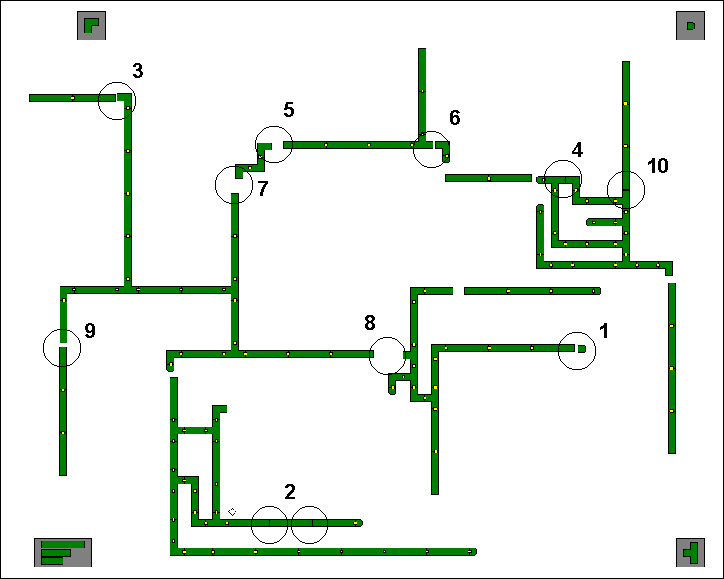
Figure 3. Workspace map for the first Follow task
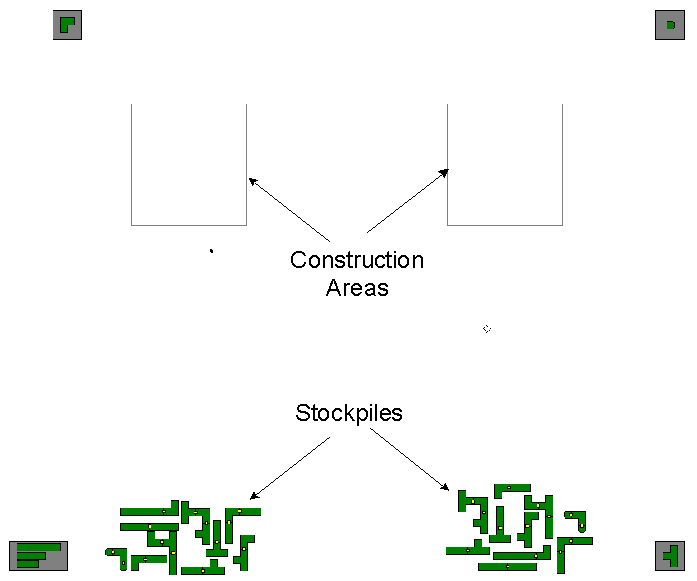
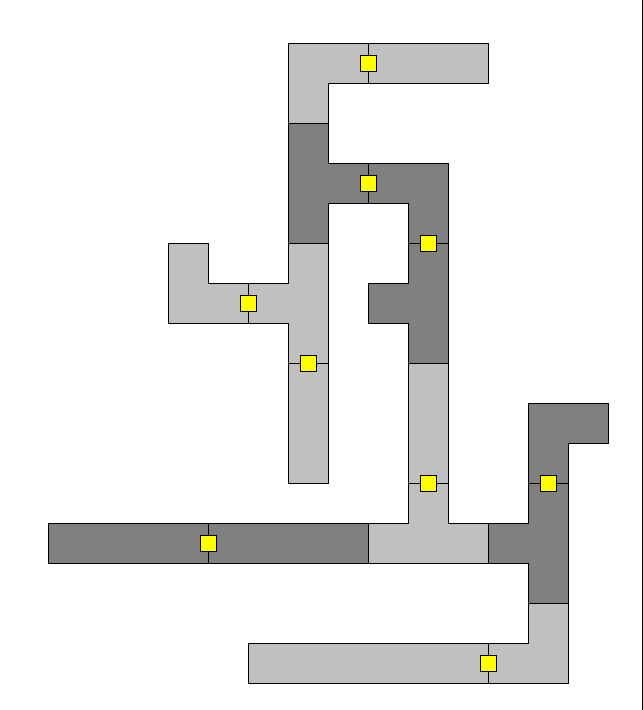
Figure 4. Initial workspace state (left) and first goal (right) for the first Copy task
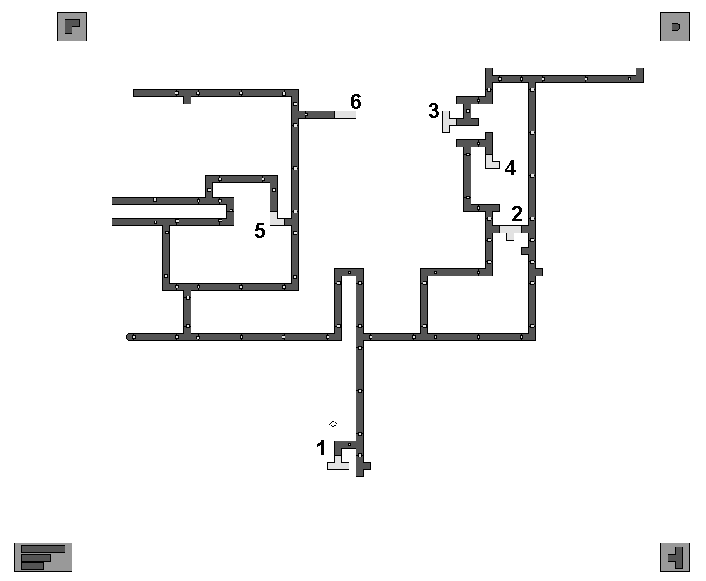
Figure 5. Workspace map for the first Direct task
The study used two designs, the first for a formal analysis and the second for an exploratory analysis. The formal study combines two independent variables in a two-way mixed factorial design: View is a between-participants factor, and Task is a repeated-measures factor. The hypothesis is that the additional awareness information in the radar view will improve people’s speed, efficiency, and satisfaction with a groupware system. The hypothesis is tested by looking for effects of View in interaction with Task. Differences between tasks are expected, since the different task types are not related. Three dependent variables are measured within each cell of the diagram in Table 2.
Task: |
||||
Weld |
Copy |
Direct |
||
| View: | Radar view | Pairs 1-10 |
Pairs 1-10 |
Pairs 1-10 |
| Overview | Pairs 11-20 |
Pairs 11-20 |
Pairs 11-20 |
|
Table 2. Experimental design for formal experiment.
In addition to the between-participants comparison, we wanted to gather preference data; therefore, participants used both the radar and overview interfaces so that they could state which they preferred. The same three measures were taken for the second set of tasks, so that exploratory within-participants analyses could be carried out as well.
The exploratory design encloses the first, and combines three independent variables in another two-way mixed design: View is now a within-participants variable, Order is a between-participants variable, and Task is again a repeated-measures variable but now nested within View. In Table 3, the shaded cells correspond to the primary design above.
View: |
|||||||
Radar view |
Overview |
||||||
Task: |
Task: |
||||||
Weld |
Copy |
Direct |
Weld |
Copy |
Direct |
||
| Order: | Radar first: |
P 1-10 |
P 1-10 |
P 1-10 |
P 1-10 |
P 1-10 |
P 1-10 |
Overview first: |
P 11-20 |
P 11-20 |
P 11-20 |
P 11-20 |
P 11-20 |
P 11-20 |
|
Table 3. Experimental design for exploratory data collection (P = Pair).
We use five measures in this study: completion time, perceived effort, verbal efficiency, overall preference, and strategy use. These can be characterized as product, process, or satisfaction measures (see Table 4).
Type of measure |
Measure used |
| Product | Completion time |
| Process | Verbal efficiency, perception of effort, strategy use |
| Satisfaction | Overall preference |
Table 4. Summary of measures used
Participants were recruited from the student community at the University of Calgary, and were paid $10. Forty people participated in the study, 30 men and 10 women. Although there were unequal numbers of female and male participants, sex pairings were equalized across the two conditions, as shown in Table 5.
| Pairing: | Overview Condition |
Radar Condition |
| Male-Male | 6 pairs |
6 pairs |
| Female-Female | 1 pair |
1 pair |
| Female-Male | 3 pairs |
3 pairs |
Table 5. Sex pairings of experimental groups
Participants ranged in age from 19 to 48 years, and averaged 27.4 years. Participants were assigned a partner for the study, either by choosing one themselves or by random assignment. Participants had limited prior experience with groupware. The only groupware systems that participants used more than once per week were multi-player games (eight participants), and email systems and web browsers (all participants). None of the participants had previously seen the groupware system used in the study.
Participants were first introduced to the system’s functions. Pairs were then randomly assigned to either the radar or the overview condition, and the specifics of their miniature view were explained. Participants were then allowed to practice with the system until they could each perform a basic set of simple tasks (selecting, dragging, scrolling, welding, and unwelding) to the experimenter’s satisfaction.
Pairs then completed seven tasks with the pipeline system: three tasks with one version of the system (either radar or overview), and then three with the other version. For each task, a similar procedure was followed. First, the experimenter explained the task and the goal. Second, the pair completed a practice exercise for the task. Third, the pair carried out the task. Fourth, participants filled out a questionnaire relating to the task. After all tasks were completed, participants also filled out a final questionnaire relating to their preferences.
Tasks 1-3 (radar) |
Tasks 1-3 (overview) |
Tasks 4-6 (radar) |
Tasks 4-6 (overview) |
|
| Radar 1st | Pairs 1-10 |
Pairs 1-10 |
||
| Overview 1st | Pairs 11-20 |
Pairs 11-20 |
Table 6. Task sequence for radar and overview conditions
Pairs worked with both interfaces so that they could state their preference at the end of the session. Both interface order and task order were counterbalanced; the second three tasks were always done in the same order as the first three tasks.
Four types of data were collected.
| How difficult was it to complete this task? | difficult |
• |
• |
• |
easy |
| How much effort did this task require? | little effort |
• |
• |
• |
a lot of effort |
| How hard did you have to concentrate to do this task? | not hard |
• |
• |
• |
very hard |
| How difficult was it to discuss things during the task? | easy |
• |
• |
• |
difficult |
Table 7. Perceived-effort questionnaire
Participants worked at separate workstations, angled so that they could not see each others’ screens, but so that they could see one another and talk easily. The experimenter sat at a recording station at the back of the room. The actions of both participants were transmitted to a third computer that showed a composite of the workspace. This computer’s screen and both voices were recorded on videotape. The layout of the experiment room is shown in Figure 6.
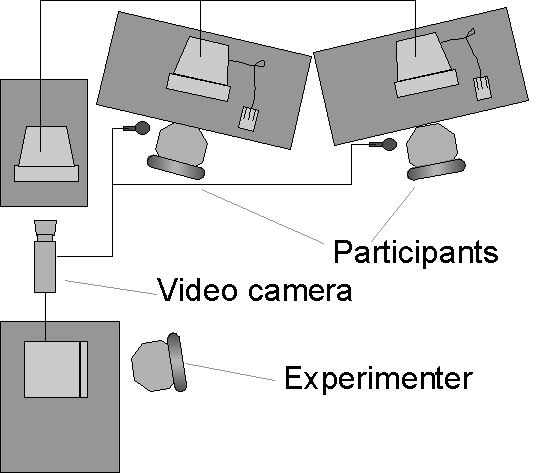
Figure 6. Experiment room setup
In the following sections, we report on the results of several analyses performed on product, process, and satisfaction measures. We first present the results of the formal study: that is, the results obtained from a group’s first three tasks. Second, we present participants’ preferences. Third, we discuss results of the within-participants exploratory study. Fourth, we summarize participants’ strategy use. The data used below reflect the fact that two groups did not complete the second set of tasks due to time restrictions, and that two groups did not have their conversation recorded due to technical problems. We do not believe that our analysis or conclusions are affected by these missing data.
Completion times were recorded for each task. Times for tasks 1-3 are summarized in Table 8, and shown in Figure 7 (error bars indicate standard deviation). Tasks took participants between about two and about eight minutes; for Follow and Direct tasks, the average completion time was less for the radar condition than for the overview condition.
| Task | View | N |
max |
min |
Mean |
sd |
| Follow 1 | Radar | 10 |
4.73 |
2.05 |
3.21 |
0.84 |
| Overview | 10 |
7.82 |
2.22 |
4.58 |
1.54 |
|
| Copy 1 | Radar | 10 |
4.77 |
2.20 |
3.36 |
0.91 |
| Overview | 10 |
4.52 |
1.70 |
3.12 |
0.90 |
|
| Direct 1 | Radar | 10 |
4.20 |
2.38 |
3.19 |
0.63 |
| Overview | 10 |
5.87 |
3.02 |
4.39 |
1.07 |
Table 8. Summary of completion times (in minutes) for tasks 1-3
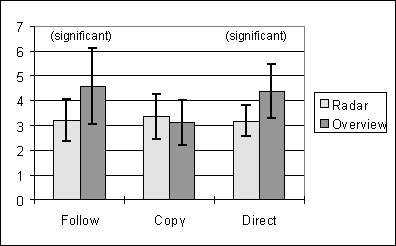
Figure 7. Mean completion times (in minutes) for tasks 1-3
We compared the independent variables Task and View using two-way analysis of variance (ANOVA). There was an interaction between Task and View (F = 7.772, p < 0.05). Since the three kinds of tasks were quite different, as mentioned above, differences between task types were expected and were not analyzed. To explore the effect of View in the interaction, posthoc comparisons of radar and overview completion times were carried out for each task type. Our expectation was that the radar condition would have lower completion times; therefore, for the Follow and Direct tasks we used one-tailed t-tests. However, completion times for the Copy task were contrary to our expectation, and so we could not use a one-tailed test. As a fallback for this task, we used a two-tailed test instead. A Bonferroni correction was employed to maintain alpha below 0.05; therefore, only those effects with p < 0.0167 were considered significant. Of the three tasks, differences in Follow and Direct were significant. Results of the posthoc comparisons are summarized in Table 9. The proportion of variance accounted for by View is indicated by the squared point-biserial correlation coefficient (r2pb). The coefficient indicates that only about one-quarter to one-third of the variance in the sample is accounted for by View.
| Task type | df |
tails |
t (obtained) |
p |
r2pb |
| Follow 1 | 18 |
1 |
2.48 |
< 0.0167 |
0.255 |
| Copy 1 | 18 |
2 |
-0.580 |
= 0.569 |
|
| Direct 1 | 18 |
1 |
3.05 |
< 0.0167 |
0.341 |
Table 9. Comparisons of completion times for tasks 1-3
Verbal interaction in the first three tasks was recorded and transcribed. Communication efficiency was measured by counting the number of words in a particular category. In the Follow and Direct tasks, the category included words spoken to provide directions: for example, utterances that described locations or provided directions. For the Copy task, the category included words spoken to establish which pipe section the copier was to select next: for example, utterances indicating or describing a piece.
Two assistants each coded half of the transcripts and counted the words in each category. On a test set of four transcripts, inter-rater agreement between the two coder’s counts (using Pearson’s r) was above 80% for all three tasks. Word counts are summarized in Table 10, and mean counts are illustrated in Figure 8 (error bars indicate standard deviation).
| Task | View | N |
max |
min |
Mean |
sd |
| Follow 1 | Radar | 8 |
123 |
64 |
98.75 |
21.77 |
| Overview | 10 |
348 |
103 |
221.43 |
77.09 |
|
| Copy 1 | Radar | 8 |
224 |
0 |
129.08 |
86.55 |
| Overview | 10 |
133 |
1 |
73.30 |
49.59 |
|
| Direct 1 | Radar | 8 |
345 |
104 |
223.50 |
81.40 |
| Overview | 10 |
427 |
138 |
280.97 |
98.09 |
Table 10. Summary of verbal efficiency (in number of words) for tasks 1-3
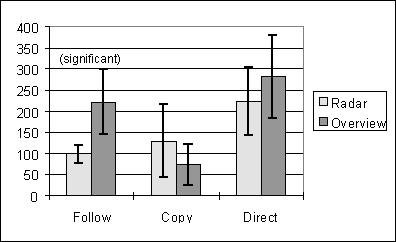
Figure 8. Mean verbal efficiency (in number of words) for tasks 1-3
Analysis of variance again showed an interaction between Task and View (F = 17.03, p < 0.05). To assess the effect of View on verbal efficiency, we compared radar and overview conditions for each task type. We used one-tailed t-tests for the Follow and Direct tasks; again, means for the Copy task did not meet my assumptions for using one-tailed tests, so a two-tailed test was used. The tests showed a significant difference only for the Follow task. A summary of the comparisons is shown in Table 11.
| Task type | df |
tails |
t (obtained) |
p |
r2pb |
| Follow 1 | 18 |
1 |
4.34 |
< 0.0167 |
0.541 |
| Copy 1 | 18 |
2 |
-1.72 |
0.104 |
|
| Direct 1 | 18 |
1 |
1.32 |
0.101 |
Table 11. Comparisons of verbal efficiency for tasks 1-3
Perception of effort was measured by a repeated questionnaire given after each task. The questionnaire looked at: (1) overall difficulty, (2) effort required, (3) concentration required, and (4) difficulty discussing the task. Questions used five-point scales with semantic anchors (see Table 7). Responses were translated to interval scores, using 1 to represent least effort and 5 to represent most effort. Table 12 summarizes mean responses for each question in each task, and Figure 9 illustrates the means. Note that lines connecting the points are intended only to visually differentiate the two conditions, not to imply connections between questions.
We compared responses from radar and overview conditions on each question. Again, we used one-tailed tests for Follow and Direct tasks; again, means for the Copy task did not match assumptions for using one-tailed tests, so two-tailed tests were used. Alpha of 0.05 was divided between the 12 tests; therefore, only results where p < 0.0042 were considered significant. None of the comparisons showed significant differences. Comparisons are summarized in Table 13.
| Task: | Follow 1 |
Copy 1 |
Direct 1 |
||||||||||
| Question: | 1 |
2 |
3 |
4 |
1 |
2 |
3 |
4 |
1 |
2 |
3 |
4 |
|
| Mean | Radar | 1.65 | 2.05 | 2.55 | 1.70 | 1.90 | 2.30 | 2.40 | 2.15 | 1.90 | 2.40 | 2.50 | 2.20 |
| Overview | 2.10 | 2.75 | 2.75 | 2.15 | 1.30 | 1.55 | 2.30 | 1.50 | 2.15 | 2.55 | 2.80 | 2.70 | |
| SD | Radar | 0.75 | 0.94 | 0.94 | 0.86 | 0.91 | 1.03 | 1.05 | 1.09 | 0.79 | 0.99 | 0.95 | 0.95 |
| Overview | 1.07 | 0.97 | 1.02 | 1.09 | 0.57 | 0.69 | 0.98 | 0.69 | 0.99 | 0.89 | 1.01 | 1.30 | |
Table 12. Summary of questionnaire responses, tasks 1-3
| 1. How difficult was it to complete this task? |
| 2. How much effort did this task require? |
| 3. How hard did you have to concentrate to do this task? |
| 4. How difficult was it to discuss things during the task? |
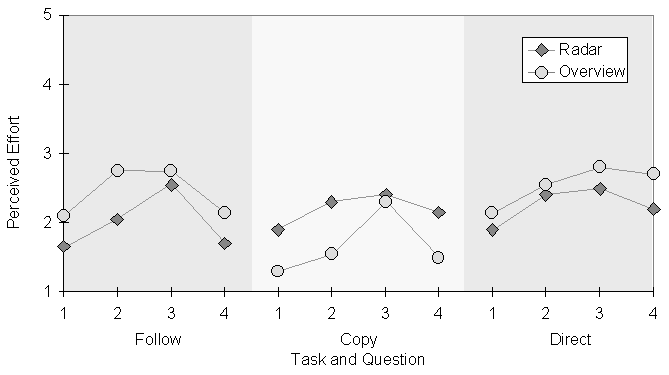
Figure 9. Mean questionnaire responses for tasks 1-3
Question |
Follow 1 |
Copy 1 |
Direct 1 |
||||||
df |
tails |
p |
df |
tails |
p |
df |
tails |
p |
|
1 |
38 |
1 |
0.0656 |
38 |
2 |
0.0171 |
38 |
1 |
0.1910 |
2 |
38 |
1 |
0.0130 |
38 |
2 |
0.0101 |
38 |
1 |
0.3088 |
3 |
38 |
1 |
0.2619 |
38 |
2 |
0.7566 |
38 |
1 |
0.1686 |
4 |
38 |
1 |
0.0780 |
38 |
2 |
0.0299 |
38 |
1 |
0.0868 |
Table 13. Comparisons of perceived-effort questions
After all tasks were completed and pairs had used both interfaces, participants were asked three questions about which system they preferred. The questions asked which system better supported collaborative work, which system was easier to use for group tasks, and which system the participant preferred overall. Almost all of the participants who responded chose the radar view, as shown in Table 14.
| Which system: | Radar |
Overview |
| 1. …better supported your collaboration | 35 |
3 |
| 2. …was easier for group work | 38 |
0 |
| 3. …did you prefer overall | 38 |
0 |
Table 14. Number of participants preferring each interface
We analyzed these responses using one-way X2 tests, summarized in Table 15. Again, alpha was maintained at 0.05. Not surprisingly, the number of participants choosing the radar condition was significantly higher than the expected number for each question.
c 2 |
df |
p |
|
| Question 1 | 26.95 |
1 |
p < 0.0167 |
| Question 2 | 38.00 |
1 |
p < 0.0167 |
| Question 3 | 38.00 |
1 |
p < 0.0167 |
Table 15. X 2 analysis of preference questions
We also looked at the strategies that groups used to carry out the tasks in the two conditions. In particular, we recorded the strategy used to indicate locations (for the Follow and Direct tasks) and to indicate pieces (for the Copy task). We identified strategies subjectively by watching the session videotapes. People used a wide variety of methods, both verbal and nonverbal, for indicating locations and pieces. The strategies are described below in Table 16.
There were several differences in strategy use between the two conditions, differences that can be partly attributed to the information available in the two interfaces. Strategy use is summarized in Table 17. In general, groups in the overview condition used a wider range of strategies than groups in the radar condition. Strategies that we observed only in the overview condition include pipe-tracing (Direct task), 1D-relative-and-wait, follow-my-cursor, map-coordinates, and move-piece-to-show (Follow task). The only strategy seen solely in the radar condition was follow-rectangle (Follow task), which is understandable since the overview did not provide a view rectangle to follow.
| Strategy | Used in | Description |
| Relative-to-you | Follow, Direct | Directions based on the other person’s current location: e.g. "up and left from where you are" |
| Describe-location | Follow, Direct | A description of an object at the location: e.g. "the squiggly looking thing" |
| Left-right-top-bottom | Follow, Direct | Rough coordinate system dividing the workspace into four blocks: e.g. "next one is in the top left corner" |
| Relative-to-previous | Follow, Direct | Directions based on a previous identified location: e.g. "near where we were for the last one" |
| Map coordinates 3x3 | Follow, Direct | Directions based on a 3 by 3 grid: e.g. "go to 1,2" |
| Pipe-tracing | Direct | Directions to follow a line of pipe: e.g. "follow this pipe along to the right, and then it goes up" |
| Follow-rectangle | Follow | One person tracks the other by following their view rectangle in the radar |
| Relative-to-us | Follow | Directions given when both participants are in the same place: e.g. "now down and a little to the left from here" |
| Move-piece-to-show | Follow | One person moves a pipe section to indicate a location through the radar or overview |
| 1D-relative-and-wait | Follow | Directions to move up, down, left, or right, after which the person giving directions waits until success is established |
| Follow my cursor | Follow | One person follows the other’s main view cursor |
| Describe-piece | Copy | A description of the next piece to be used: e.g. "it’s an elbow section with a medium straight on the end" |
| Show by move | Copy | The piece is moved back and forth in the storehouse |
| Show by drag | Copy | The piece is dragged up to the construction area |
| Show by drop | Copy | The piece is moved outside the storehouse and dropped |
| Show by placing | Copy | The piece is moved to the construction area and placed |
Table 16. Strategies used for directing and indicating
| Radar condition | Overview condition | |
| Direct | relative-to-you describe-location left-right-top-bottom relative to previous |
left-right-top-bottom describe-location relative to previous relative-to-you pipe tracing |
| Follow | follow rectangle left-right-top-bottom relative to us relative to previous relative-to-you describe-location |
left-right-top-bottom describe-location move piece to show relative to us relative to previous 1D and wait follow my cursor relative to you map coordinates (3x3) |
| Copy | show by drag show by move describe-piece |
show by drop describe-piece show by placing |
Table 17. Strategy use in the three test tasks
Certain strategies were more common in radar groups because the radar made them either possible or obvious. In the Direct task, radar groups used the relative-to-you strategy far more often than overview groups. One reason for this disparity is that the radar shows the other person’s location, and the overview does not. Similarly, radar groups in the Follow task depended heavily on follow-rectangle, a strategy not possible in the overview condition. In the Copy task, the radar and overview conditions used different variants of the "show" strategy: radar groups primarily used show-by-drag, whereas overview groups primarily used show-by-drop. Again, the difference can be explained by the information differences in the two miniatures: the radar showed continuous movement, whereas the overview only showed position changes when an object was dropped.
Completion times and questionnaire results were also gathered for the second trio of tasks, those completed with the group’s alternate interface. These measures allowed us to consider the issue of what happens when a group moves from one view type to another. We assumed that all groups would perform better in the second set of tasks because of practice, but we wondered whether the improvement would be greater when going from the radar view to the overview, or when going from the overview to the radar view. We consider the differences between first and second trials for completion time and perceived effort. Verbal records were not transcribed for the second set of tasks, so differences in communication efficiency are not analyzed.
These results are exploratory because of a potential confound of training effect. That is, within-participants differences cannot be adequately explained in terms of View, due to the confound of training effects from the first interface. Therefore, these results are used only as supplementary findings.
The time difference between a group’s first and second attempts at a particular task indicates their improvement, and we expected that groups would be faster on their second attempt. Table 18 summarizes the differences between a group’s first and second attempts at each task. Figure 10 illustrates these changes.
For groups that started with the overview and then moved to the radar view, the results were as we expected: for each task type, groups were faster in the second attempt (using the radar view). However, when groups started in the radar condition and then used the overview, only the Copy task was faster in the second attempt. The Follow and Direct tasks were both slower with the overview: Follow by about a minute, and Direct by about half a minute.
| Task | View order | N |
max |
min |
Mean |
sd |
| Follow | Radar then overview | 10 |
4.48 |
-0.60 |
0.68 |
1.57 |
| Overview then radar | 9 |
0.17 |
-4.55 |
-1.44 |
1.42 |
|
| Copy | Radar then overview | 9 |
1.52 |
-1.37 |
-0.14 |
1.04 |
| Overview then radar | 9 |
-0.12 |
-1.17 |
-0.51 |
0.36 |
|
| Direct | Radar then overview | 9 |
1.53 |
-0.43 |
0.47 |
0.57 |
| Overview then radar | 9 |
-0.27 |
-1.98 |
-1.03 |
0.48 |
Table 18. Summary of completion times differentials (in minutes)
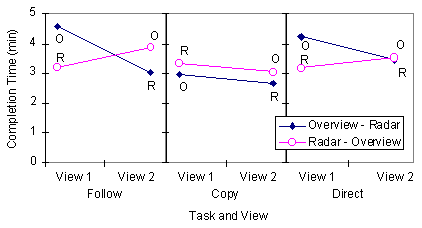
Figure 10. Mean changes in completion time from first to second attempts at a task.
A similar analysis was done with questionnaire responses. The difference between a participant’s first and second responses to the questionnaire indicated whether they thought the second task was easier or harder than the first. Differentials were calculated by subtracting the first response from the second. Table 19 summarizes the mean differentials for each questionnaire question.
| Task | Follow |
Copy |
Direct |
||||||||||
| Question | 1 |
2 |
3 |
4 |
1 |
2 |
3 |
4 |
1 |
2 |
3 |
4 |
|
| Mean | Radar then overview | 1.13 |
0.95 |
0.65 |
0.80 |
0.33 |
0.22 |
0.06 |
-0.11 |
1.44 |
1.06 |
1.17 |
0.89 |
| Overview then radar | -0.83 |
-1.22 |
-0.94 |
-1.06 |
-0.06 |
-0.11 |
-0.56 |
-0.28 |
-0.06 |
-0.11 |
-0.50 |
-0.22 |
|
| SD | Radar then overview | 1.28 |
1.36 |
1.31 |
1.54 |
0.84 |
1.06 |
1.00 |
1.13 |
1.04 |
1.11 |
0.71 |
1.08 |
| Overview then radar | 0.99 |
1.06 |
0.73 |
1.11 |
0.73 |
0.90 |
0.78 |
0.75 |
1.30 |
1.23 |
1.42 |
1.40 |
|
Table 19. Mean questionnaire differentials
Figure 11 illustrates these differentials in perceived effort. In the figure, points below the zero line indicate that the second task was perceived to be easier than the first, and points above the line that the second task was perceived to be harder. Again, the lines in the figure are intended only to visually separate the two data sets.
We assumed that as groups became more experienced at each task, they would consider it to require less effort. This was the case when groups used the overview first and the radar second: they felt that the second task was easier. However, when groups used the radar and then the overview, they felt that the second task was more difficult than the first.
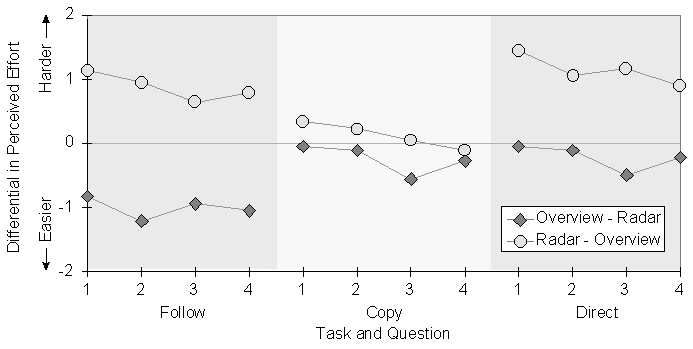
Figure 11. Perceived effort differentials between first and second attempts at a task.
A variety of results were obtained, some showing improvement when there was additional awareness information, and some showing no difference between the two displays. When using the radar view, groups finished the Follow and Direct tasks significantly faster, and used significantly fewer words in the Follow task. The within-participants measures appear to reinforce these findings, and participants overwhelmingly preferred the radar view when they had seen both interfaces. However, no differences were found in perceived effort for any of the tasks, and no differences were found on any measure for the Copy task. In addition, strategy use differed in several ways between the conditions.
The two versions of the interface differed only in that the radar view provided visual indications of the other person’s location, the location of their cursor, and the motion of objects that they moved. The significant differences between these two very similar interfaces clearly suggests that the additional awareness information helped people complete some tasks more quickly and more efficiently. We interpret and explain these findings below. First, we consider two reasons why the additions to the radar view were successful: that they allow visual communication, and that they provide continuous feedback and feedthrough. Second, we examine the measures of perceived effort, and consider why the Copy task was not affected by the view type.
The radar condition provided visual indication of the other person’s location and activity by showing view rectangles and telepointers. This information helped people complete the Follow and Direct tasks more quickly. One way that visual information aided the task was by allowing people to use strategies that were better suited to the task and therefore more effective.
In the Follow task, the joiner (the person with the map) had the job of communicating ten successive workspace locations to the welder (who had no map). When groups used the overview system, the joiner had to convey this information verbally. Joiners used a wide variety of techniques for indicating locations, and were generally adept at choosing a technique that would best describe where the welder should go next. They often began with general directions (e.g. left-right-top-bottom or relative-to-previous strategies), and then gave more specific indication using the describe strategy. In many cases, however, the locations were not easy to indicate using any of the strategies. For example, when the next location was not obviously in a corner of the workspace, and not in an obvious direct line from the current position, then neither of left-right-top-bottom or relative-to-here were appropriate. In these situations, the joiner had to rely more heavily on describing the location, and had to be more careful in planning and delivering her utterances. Often, their descriptions became fairly complicated:
J: The second weld is near the bottom in the middle section, there’s two pieces of pipe, ok, there’s two longer pieces of pipe, ok, there’s, umm, right in the middle, right on top of the lowermost piece of pipe, in the middle there, there’s two welds that need to be done.
W: Uh, ok…
The joiner’s verbal instructions had to be interpreted by the welder, and this process took time. In addition, the joiner would sometimes have to provide more than one round of description before the welder found the correct location. In other cases, the problem was not incorrect interpretation, but incorrect direction:
J: Six is uh, down, to the right…<J moves to the left side of the workspace>
W: <moves down and right>
J: Um, the very edge, there’s one sticking down which is not welded
W: <looking for piece>
J: Uh, at the bottom?
J: See that?
W: No
J: Uh, oh- I mean, sorry, to the left, sorry
W: Oh, ok <moves left>
The radar view, in contrast, allowed people to use a much more effective strategy. The follow-rectangle strategy meant that the welder could find the right location simply by following the joiner’s view rectangle. The visual indication of the joiner’s location transformed the task from a series of complicated verbal exchanges to a relatively simple perceptual task of aligning rectangles on the screen. The follow-rectangle strategy provides specific and accurate information about where to go, regardless of where the next location is in the workspace. In addition, it allows the joiner to communicate simply by going about their job: they need not spend extra time thinking about how to best indicate the location.
The overview condition did in fact allow a limited kind of visual communication, but it was not as obvious as the follow-rectangle strategy, and it was not used very often. In the show-by-move strategy, the joiner would navigate to the next location, and then move a pipe section back and forth, knowing that each move would show up on the welder’s overview. Although this strategy could provide a good indication of location, it could not be used consistently because there was not always a convenient section of pipe to move back and forth. In particular, where all the pipe sections in the area were connected into large structures, moving a structure would not provide an accurate indication of the joiner’s location.
The transformation of the task from a verbal to a visual activity also explains why groups used significantly fewer words in the Follow task when they used the radar view. Groups using the follow-rectangle strategy had the necessary location information available in the radar, and so they did not need to communicate locations verbally. In the audio record, the follow-rectangle strategy is characterized by few words, and almost none of the complicated and lengthy descriptions seen in the overview condition. However, the radar condition was never completely silent. In particular, joiners would often make general statements about the location of the next weld:
J: ok, we’re going over to the left…that’s getting welded
J: OK, now, way over here…ok, that needs to be welded
J: OK, and just over left, same height, weld this together…
Since these directions are too unspecific to fully indicate a location, the joiners must have been providing general directions but leaving the specifics up to the radar. In a few cases, when the joiner’s directions became more specific, welders would remind them that specific directions were unnecessary since the radar view provided the required information.
The Direct task also asked one person (the director) to communicate a series of successive workspace locations to the other person (the actor). Again, the director had a workspace map, and the actor had no map. In this task, the director was not allowed to move around in the workspace, so radar users could not employ the follow-rectangle strategy. However, even though the director in both conditions had to indicate locations verbally, the information in the radar view allowed them to use more effective strategies.
As in the Follow task, workspace locations were not particularly easy to describe. Directors in the overview condition used several techniques to indicate locations, but still had some difficulty in indicating the right place to the actor, even though the actor could drop a piece to show their location:
D: Next, I need a small piece, from the bottom left
A: ok <gets piece>
D: and you want it right in the centre, in that open space, there’s a little pipe that sticks out
A: centre in the open space…
D: in the top…you see one little pipe that sticks out, on the left?
A: ok, I’m here. <drops piece> Where do you want me to go?
D: ok, uh, up, to go to the top
A: the top right corner or the top left corner?
D: top left.
A: here? <drops piece>
D: yeah. Now go exactly right, from there. And you see, there’s a T, with a pipe, straight?
A: There?
D: I can’t see where you are.
Directors in the radar condition used many of the same strategies for indicating the next location (e.g. describe-location, left-right-top-bottom, relative-to-previous) as seen in the overview condition. However, when these strategies failed, location information in the radar view gave directors a fallback strategy that worked well even when locations were difficult to describe. Since directors could see exactly where the actor’s view rectangle and telepointer were, they could provide relative directions (go up, go down, go left, go right) based on the actor’s current location. Relative directions are simple to construct, and are much less prone to misinterpretation. For example:
D: ok, move to the left, stop, stop. Move up, move straight up, move straight up, stop. Go a little bit to the left, stop, stop. Ok, now you see there are two T sections…
The relative-to-you strategy was not generally the first strategy chosen by a director, but it was often the one that they used when they ran into difficulty. In one session, the director started to describe the location, but after making a few attempts, resorted to relative directions:
D: Okay, number five. If you look at…there’s some pipes to the…where, they’re kind of…um…
D: Go down. <continues with relative directions>
The difference between descriptive or relative directions can also partly explain why the radar did not lead to fewer words spoken in the Direct task. Even though these two methods of giving directions differ greatly, nothing about giving relative directions implies that fewer words will be needed. For example, the first of the two utterances (D1) below might be harder to plan and to understand, but both utterances contain the same number of words. It may be that word counts are an insufficient measure of verbal efficiency, and that other metrics like utterance length or vocabulary size may have been more appropriate.
D1: ok, near the very bottom you’ll notice that there’s a vertical line right in the middle in the bottom of the pipeline, ok there is a T, a T, under that corner piece…
D2: ok, move to the left, stop, stop. Move up, move straight up, move straight up, stop. Go a little bit to the left, stop, stop. Ok, now you see there are two T sections…
In summary, the location information presented in the radar view allowed people to communicate required information visually in the Follow and Direct tasks. The visual information allowed different strategies for carrying out the tasks, and allowed simplification of verbal utterances. In the Follow task, the view rectangle was of primary importance in helping people complete the task more quickly; in the Direct task, both the view rectangle and the telepointer were important. This difference can be ascribed to the fact that pairs in the Follow task could use their main view to negotiate local directions, and so the radar view was most useful in aligning views. In contrast, directors in the Direct task could only gather information about their partner through the miniature, and so had to provide both large-scale and small-scale directions using the miniature.
The radar view provided continuous feedback about location and piece position, feedback that allowed groups to complete the Follow and Direct tasks more quickly. In particular, this feedback gave people visual evidence of understanding (Brennan 1990), which was more effective and less error-prone than verbal evidence.
In the Direct task, the director guides the actor’s movement by giving her an instruction. With each instruction, the director requires evidence that he has succeeded in conveying the correct meaning to the actor, and that the actor has successfully moved where she is supposed to go. In addition, the director often cannot give the next instruction until he knows that the actor has successfully completed the current one. The information differences between the radar view and the overview provided directors with different kinds of evidence, and afforded different means for establishing that instructions have been understood and carried out.
The overview lets the actor give evidence in two ways: verbal acknowledgment (e.g. "ok, I’m there") or the "here-I-am" strategy of dropping an object to indicate their location (e.g. "ok, can you see my piece?"). In both of these methods, the evidence is given at the end of an action: that is, the director gives the instruction, and the actor carries it out to the best of their ability before acknowledging. The problem with this form of interaction is that the director may give poor descriptions and the actor may go the wrong way. Providing evidence only at the end of the action means that time is wasted when the actor makes a mistake:
D: …go up to that part that’s jetting across the middle…
A: <moves>
A: <drops piece> this part right here?
D: Uh, on the left side actually, on the left side…
In addition, both the verbal and the "here-I-am" methods of acknowledgment have other drawbacks. If the actor believes that they have followed the instruction correctly, but really haven’t, they will mislead the director with their acknowledgment. The director has little chance to detect the error, and so may continue, piling error upon error. The "here-I-am" strategy at least gives the director concrete information about the actor’s location, but this information can be out of date. Actors would often drop objects, then pick them up and keep moving. The director, however, saw only the out-of-date picture of the dropped piece. If they assumed that the location of the piece was also the location of the actor, errors could ensue.
The awareness information in the radar provided different kinds of evidence. Verbal acknowledgment was still possible, but the radar also showed up-to-the-moment object movement and viewport location. In the Direct task, these representations could be used as immediate visual evidence of the actor’s understanding and intentions. If the actor started moving the wrong way, the director would see the misunderstanding immediately:
D: ok, just above where you were working before…
A: <begins moving>
D: oh, not too far…yep, right…nope, up, up, up, higher, yeah, right there.
The availability of continuous evidence also made it possible for people to give continuous instructions. This is a strategy with far fewer verbal turns, and where the actor acknowledges implicitly through their actions. Clark (1996) summarizes the difference between verbal and visual acknowledgment for on-going "installment" utterances like instructions: "in installment utterances, speakers seek acknowledgments of understanding (e.g. ‘yeah’) after each installment and formulate the next installment contingent on that acknowledgment. With visual evidence, [the speaker] gets confirmation or disconfirmation while he is producing the current installment" (p. 326).
In summary, evidence of understanding and action in the radar was accurate, easy to get, and timely. The director was able to determine more quickly whether the instruction was going to succeed, and could reduce the cost of errors.
Measures of perceived effort in the between-participants analysis showed no differences between the two conditions for any task. This runs contrary to both my expectations and my observations. We observed groups having more difficulty discussing the task, and making more errors, when they used the overview. It is possible that the questionnaire was a poor measure of effort. The main problem was that people had nothing to compare their experience to, and may have been unable to accurately indicate their effort on the scales given. This problem seems more likely considering that once participants had seen both interfaces, questionnaire responses showed greater differences (see Figure 8). In addition, the overwhelming preference for the interface with the added awareness information (see Table 2) also suggests that there were real differences in the experience of using the system, but that the effort measures were insensitive to these differences.
In the Copy task, the two participants build two identical structures from two stockpiles. The leader had a paper picture of what was to be built, and had to indicate each successive pipe section to the copier, who had no picture. The Copy task showed no effects of View on any measure. There are several reasons why the additional awareness information did not improve performance or efficiency, and the most important of these again concerns strategy. The strategy that a group chose for the Copy task had a large impact on their completion time and their verbal efficiency, regardless of which interface they used. Participants typically used one of two strategies to indicate the next piece to their partners: they could describe the piece verbally (describe-piece), or they could show it to them through the radar or overview (show-by-drag or show-by-drop). Describing pieces was certainly the wordier strategy and was also slower.
One underlying reason for the lack of difference is that there were equivalent strategies in both the radar and overview conditions. The show-by-drag and show-by-drop strategies provide almost the same information to the person doing the copying. However, since show-by-drop is a less obvious strategy than show-by-drag, we had expected describe strategies to be more prevalent in the overview condition. However, this was not the case. Even though the radar view allowed people to point out pieces quite easily, the video record suggests that more groups used the describe-piece strategy in the radar condition than in the overview condition. In a few cases, choosing to describe rather than show pieces seemed to be the result of inexperience: during one session, the leader said "oh right—I keep forgetting that we can both see the same radar view," whereupon she switched from a describe to a show strategy.
The combination of an equivalent strategy in the overview condition and a greater use of description in the radar condition account for the lack of speed or efficiency differences between the two conditions for the Copy task. However, it is noteworthy that while the addition of awareness information did not improve the task, neither did it significantly impair people’s performance.
There are several lessons that groupware designers can take from this study. First, the findings reiterate the value of workspace miniatures, as suggested by our previous study (Gutwin and Greenberg 1996). In the present experiment, we regularly observed people using both the radar and the overview to orient themselves in the workspace, to navigate, to keep track of the current global state of the activity, and to carry out individual work that did not fit inside the main view. All shared-workspace groupware systems will benefit from a workspace miniature.
Second, the main finding of the study is that adding workspace awareness information to the miniature—visual indications of viewport location, cursor movement, and object movement—can significantly improve speed, efficiency, and satisfaction. These awareness components should be included in shared-workspace applications.
The tasks we examined are common to many kinds of collaboration, and we believe that support for workspace awareness will also benefit more realistic tasks. Specifically, in tasks where information about locations and activities is used, and where that information is difficult to provide verbally, the radar view will have a positive effect. However, the size of the effect on real-world tasks depends upon what portion of the task can benefit from visual information and continuous feedback. In Follow and Direct, the radar condition was faster by about 25%, a substantial margin. However, these controlled tasks constrained the activity. More realistic tasks will likely include a mix of different activities, some that will benefit from the awareness information, and some that will not. Although the information will still be useful for part of the task, differences will be harder to measure.
Third, the experience of the Copy task provides a cautionary note, and suggests that the benefits of the radar view do not automatically improve performance. Potential improvements are dependent upon the information requirements of the activity and on the ways that groups choose to carry out the task. Designers should carefully consider what information is available and consider the strategies that will be used to carry out the task.
In this research, we examined the hypothesis that interface support for workspace awareness can improve groupware usability. We carried out an experiment to look at the effects of showing viewports, cursors, and object motion in a workspace miniature. For tasks that use information about location and activity, and where constructing verbal descriptions is difficult, the workspace awareness information in the radar can reduce completion time, improve communicative efficiency, and increase satisfaction. The improvements in speed and verbal efficiency can be explained in terms of visual communication and continuous feedback. Visual information about location allows groups to use more effective and more robust strategies for carrying out the Follow and Direct tasks. Continuous feedback on people’s movement through the workspace allows people to recognize and correct navigational errors quickly. The study adds quantitative evidence to the qualitative findings of the prior study (Gutwin, Greenberg, and Roseman 1996), and begins to put intuitions about awareness onto an empirical footing.
Our further research in this area will move in two directions. First, we will continue work on quantitative evaluations of groupware usability. Some of the questions that we were unable to explore in this experiment include the effects of awareness support in other kinds of tasks such as organization or creation, and how well the radar view works when there are more than two people in the group. Second, we want to look more closely at the links between shared workspaces, communication, and collaborative interaction. Work in this direction will look more carefully at naturalistic situations and use methods like conversation analysis and interaction analysis (e.g. Suchman and Trigg 1991). We believe that the connection between communication and the environment can tell us a great deal about groupware usability and about the information requirements of the next generation of groupware systems.
This research is supported in part by the Natural Sciences and Engineering Research Council of Canada, and by Intel Corporation. Thanks to Mark Roseman, Jase Chugh, Krista McIntosh, and Jeff Caird for discussions about and assistance with the system, the study, and the analysis.
GroupKit and the pipeline system used in the study are freely available at:
www.cpsc.ucalgary.ca/projects/grouplab
Baecker, R. (1993). Readings in Groupware and Computer-Supported Cooperative Work, Morgan Kaufmann, San Mateo, CA, 1993.
Bederson, B., and Hollan, J. (1994). Pad++: A Zooming Graphical Interface for Exploring Alternate Interface Physics, Proceedings of the ACM Symposium on User Interface Software and Technology, 1994, 17-26.
Brennan, S. (1990). Seeking and Providing Evidence for Mutual Understanding, Unpublished Ph.D. thesis, Stanford University, Stanford, CA, 1990.
Chapanis, A. (1975). Interactive Human Communication, Scientific American, 232, 1975, 36-42.
Clark, H. (1996). Using Language. Cambridge: Cambridge University Press, 1996.
Dourish, P., and Bellotti, V. (1992). Awareness and Coordination in Shared Workspaces, Proceedings of the Conference on Computer-Supported Cooperative Work, Toronto, 1992, 107-114.
Gaver, W. (1991). Sound Support for Collaboration, Proceedings of the Second European Conference on Computer Supported Cooperative Work, 1991, 293-308.
Greenberg, S. (1991). Computer-Supported Cooperative Work and Groupware, Academic Press, London, 1991.
Grudin, J. (1990). Groupware and Cooperative Work: Problems and Prospects, in The Art of Human-Computer Interface Design, B. Laurel ed., Addison-Wesley, Reading, Mass., 1990, 171-185.
Gutwin, C. (1997). Workspace Awareness in Real-Time Distributed Groupware. Unpublished Ph.D. dissertation, University of Calgary, Calgary, AB, 1997. Available from: www.cs.usask.ca/faculty/gutwin/publications
Gutwin, C. and Greenberg, S. (1996). Workspace Awareness for Groupware. Conference companion of the Conference on Human Factors in Computing Systems (CHI’96), Vancouver, 1996, 208-209.
Gutwin, C., Roseman, M., and Greenberg, S. (1996). A Usability Study of Awareness Widgets in a Shared Workspace Groupware System. Proceedings of the Conference on Computer-Supported Cooperative Work (CSCW’96), Boston, 1996, 258-267.
Nielsen, J. (1992). Usability Engineering, Academic Press, New York, 1992.
Olson, J. S., Olson, G. M., Storrosten, M., and Carter, M. (1992). How a group-editor changes the character of a design meeting as well as its outcome, Proceedings of Proceedings of the ACM Conference on Computer Supported Cooperative Work (CSCW'92), Toronto, Ontario, 1992, 91-98.
Olson, J., Olson, G., and Meader, D. (1995). What Mix of Video and Audio is Useful for Small Groups Doing Remote Real-Time Design Work?, Proceedings of the Conference on Human Factors in Computing Systems (CHI'95), 1995, 362-368.
Roseman, M. and Greenberg, S. (1996). Building Real Time Groupware with GroupKit, A Groupware Toolkit. Transactions on Computer-Human Interaction, 3(1), 66-106.
Segal, L. (1995). Designing Team Workstations: The Choreography of Teamwork, in Local Applications of the Ecological Approach to Human-Machine Systems, P. Hancock, J. Flach, J. Caird and K. Vicente ed., 392-415, Lawrence Erlbaum, Hillsdale, NJ, 1995.
Shackel, B. (1990). Human Factors and Usability. In Human-Computer Interaction: Selected Readings. J Preece and L Keller, eds. Hemel Hempstead, Prentice Hall, 1990.
Smith, R. B., O'Shea, T., O'Malley, C., Scanlon, E., and Taylor, J. (1989) Preliminary experiences with a distributed, multi-media, problem environment, Proceedings of Proceedings of the 1st European Conference on Computer Supported Cooperative Work (EC-CSCW '89), Gatwick, U.K., 1989
Smith, R. (1992). What You See Is What I Think You See, SIGCUE Outlook, 21(3), 18-23, 1992.
Stefik, M., D. Bobrow, G. Foster, S. Lanning, and D. Tatar. (1987). WYSIWIS Revised: Early Experiences with Multiuser Interfaces, ACM Transactions on Office Information Systems, 5(2), 147-167, 1987.
Suchman, L., and Trigg, R. (1991). Understanding Practice: Video as a Medium for Reflection and Design. In J Greenbaum and M. Kyng (eds.), Design at Work: Cooperative Design of Computer Systems, Hillsdale NJ, Lawrence Erlbaum, 1991, 65-89.
Tang, J. (1991). Findings from Observational Studies of Collaborative Work, International Journal of Man-Machine Studies, 34(2), 1991, 143-160.
Tatar, D., G. Foster, and D. Bobrow. (1991). Design for Conversation: Lessons from Cognoter, International Journal of Man-Machine Studies, 34(2), 1991, 185-210.