Traces: Visualization of Interaction
Carl Gutwin
Department of Computer Science
University of Saskatchewan
57 Campus Drive
Saskatoon, Saskatchewan, S7N 5A9,Canada
Tel: 1-306-966-8646
E-mail: gutwin@cs.usask.ca
ABSTRACT
Groupware that provides a distributed shared workspace is becoming more and more common. However, it is often difficult in these systems to maintain awareness of other people’s actions and activities. One reason for this difficulty is that people’s representations in groupware are neither as noticeable nor as expressive as their bodies in the real world. The hypothesis in this research is that making people’s actions easier to see will improve awareness, communication, and coordination in collaborative tasks. I propose as the solution to the problem the idea of traces—visualizations of people’s interaction with the shared workspace. Traces differ from previous interaction history systems in that they are oriented around people and their actions, rather than on artifacts and the changes made to them. This paper describes the idea of traces, and then describes two applications of the idea: first, telepointer trails that made gestures persistent, and second, location tracks that record people’s paths as they move and work in the shared workspace. Initial user feedback suggests that both techniques are valuable for certain kinds of collaborative situations.
KEYWORDS
: Traces, shared workspaces, visualization of interaction, gestural communication, workspace awareness.INTRODUCTION
Many kinds of distributed groupware systems provide collaborators with a shared workspace where people can work together on documents or other task objects. Shared workspaces can be seen in applications like multi-user whiteboards, virtual environments, shared drawing tools, and group editors. In addition, these systems often allow people to work either at the same time or asynchronously.
Although these systems are becoming common, they are still often clumsy to use for collaboration. In particular, it is difficult to maintain awareness of other people’s actions and activities in the shared workspace. Workspace awareness is important for communicating, coordinating tasks, and providing assistance [6,8]. Maintaining awareness is difficult because much of the perceptual information available about other people in the real world is not provided by a groupware system. For example, people gather a great deal of information from the movement and position of people’s arms and bodies in a physical workspace, but in a groupware workspace, the visual representation of each person in the workspace (their embodiment) is extremely limited. Most systems represent people with two simple objects: a telepointer that tracks their mouse cursor on all screens, and a viewport rectangle that shows the extents of their main screen on a workspace overview. Both of these techniques present awareness problems: gestural communication through a telepointer is hard to see and is easily missed; and viewport rectangles are only useful if participants are working at the same time.
My hypothesis in this research is that making actions and activities more noticeable and easier to see will improve awareness of others in shared workspaces. Specifically, it will improve people’s abilities to communicate through gestures and to coordinate efforts on a collaborative task. The inspiration for the techniques described here comes from the visual arts, particularly cartoons, which have also encountered the problem of actions being hard to see. Cartoonists often help their audiences understand a character’s actions or movements by adding new visual information to the scene—often a trail following the character’s arm or body. This idea, which I call traces, can also be used in shared workspaces.
The Traces project explores ways of visualizing people’s interaction with a shared workspace. The idea is to make certain kinds of events more perceptible, in order to provide more information to the group [7]. As a person works with the application, the state of their embodiment is continuously recorded, and selected parts of that record are made visible on the screen. The challenge is to find elements of information that are useful to others in a collaborative task, and to find ways of visualizing the information without causing distraction or screen clutter. This idea is closely related to the idea of "edit wear and read wear" introduced by Hill and Hollan [11]. However, wear techniques are object- or document-centred, recording access of or changes to artifacts, whereas traces are person-centric, recording a person’s interaction with the environment. This approach makes different kinds of information available, and allows different kinds of visualizations to be created.
In the following sections, I present two applications of traces: first, persistent gestures that aid gestural communication, and second, location trails that show where in the workspace others have been. In early tests, users agreed that both of these ideas improved interaction with others in the shared workspace, although formal studies have not yet been undertaken.
PERSISTENT GESTURES
Gestural communication is an ubiquitous part of collaboration in both physical and virtual shared workspaces [18,19]. Gestures are used to indicate objects or locations to others, to trace paths, and to demonstrate an action or manipulations before it happens. However, gestural communication with telepointers is often hard to see and hard to interpret. This is because telepointers are small, gestures usually happen quickly, and network delays often make telepointer motion jumpy compared with a local mouse cursor.
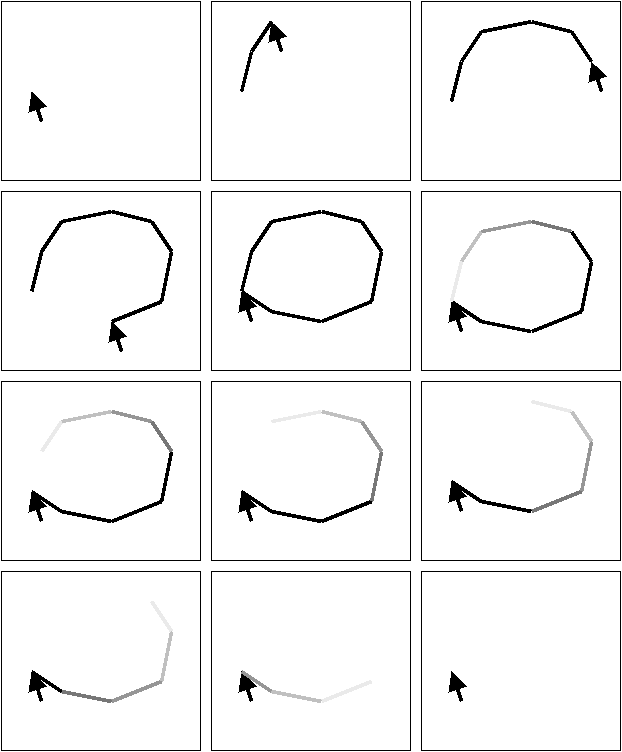
Increasing the visibility and persistence of telepointer gestures can improve gestural communication in shared workspaces. To do this, a trace-telepointer leaves a trail behind it on the screen, a line that gradually fades away (see Figure 1). The last few moments of the cursor’s movement are always visible, providing others in the workspace with more time to see and interpret the gesture.
Persistent gestures blur the line between gesturing and drawing. Many kinds of gestures are really "drawings in the air" in the first place, and adding a trace to the pointer simply builds on the idea. Drawing makes it easy to see an entire gesture at once and allows relationships to be shown over a larger distance, while the gradual fading prevents the workspace from becoming cluttered with marks. People report using the persistent gestures in three ways. First, indicating objects in the workspace is more obvious—people often circle an object with their cursor to indicate it to others, and the telepointer trails make these actions clearer. Second, persistence is useful in showing paths in the workspace, particularly when directing another person to move an object to a new location. Third, persistent trails aid in interpreting the motion of telepointers that are jumpy due to network delays. In these cases, the groupware system is unable to animate the telepointer at a high enough frame rate for smooth movement, and interpretation of the motion becomes difficult. The persistent trail clarifies the motion and helps people understand the shape of the gesture.
Figure 1. A persistent gesture: the user draws a circle, and a line trails behind the telepointer. The line fades away as time passes.
In this project, persistent gestures have been implemented in sample applications in Java and Tcl/Tk-Groupkit [15]. Figure 2 shows a simple puzzle-building application that provides the seven tangram pieces in a shared workspace. Users can move, rotate, and flip the pieces to build different shapes or pictures. Remote users are represented by coloured triangular telepointers. The persistent gesture in the workspace is drawn by a remote user to show how the large triangle piece should be moved and rotated.
Figure 3 illustrates a second application, a shared code viewer. Again, people are represented in the document workspace with telepointers (at the right of the window is a multi-user scrollbar, which shows each person’s current location in the document). In the illustration, a lab advisor is using a persistent gesture to show a student programmer where to move a variable declaration. Both of these figures are recreations of episodes seen in observations of people using the two applications.
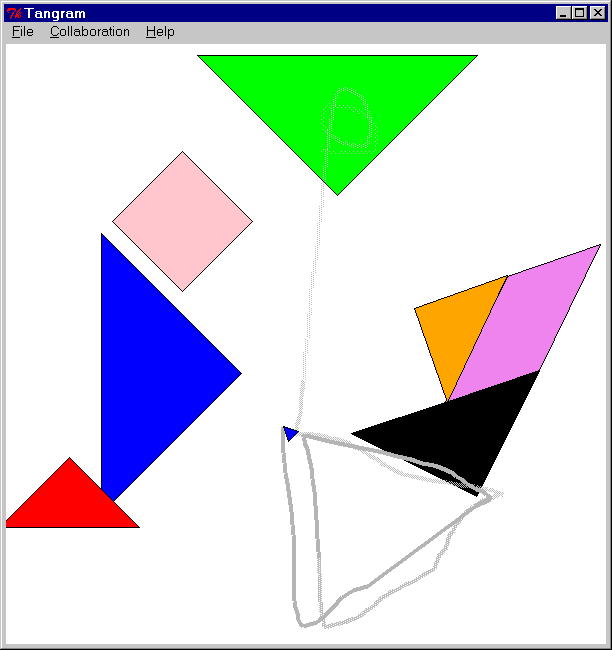
Figure 2. A persistent gesture where the remote user is showing how an object should be moved and rotated.
Implementation Details
The telepointer trails are implemented simply by keeping track of telepointer locations, drawing a line between successive points, calculating the fade effect for each existing line segment, and removing line segments after they have faded away completely. In Java applications, fading is accomplished using alpha-channel transparency; in Tcl/Tk (which does not allow transparency), the line colour is gradually changed to match the background colour and a bitmask is used to remove the line. The fading is controlled by a timer that generates callback events to update each line segment. The frequency of these callbacks, as well as the trail’s width, length, and total fading time can be adjusted using a custom control panel. In both Tcl/Tk and Java, considerable tuning was necessary to make the effect noticeable without being too overt. If the fading is too abrupt, for example, the trail can appear more like a worm chasing the telepointer than like a line that gradually fades away.
Persistence also implies extra work for the display processor. A trail of 20 line segments that fade three times per second adds 60 display events per second; in addition, there may be multiple trails for multiple users. A 266-MHz PC running a Groupkit persistent-gestures application was able to handle one trail easily, but was decidedly sluggish when showing the trails of two other users.
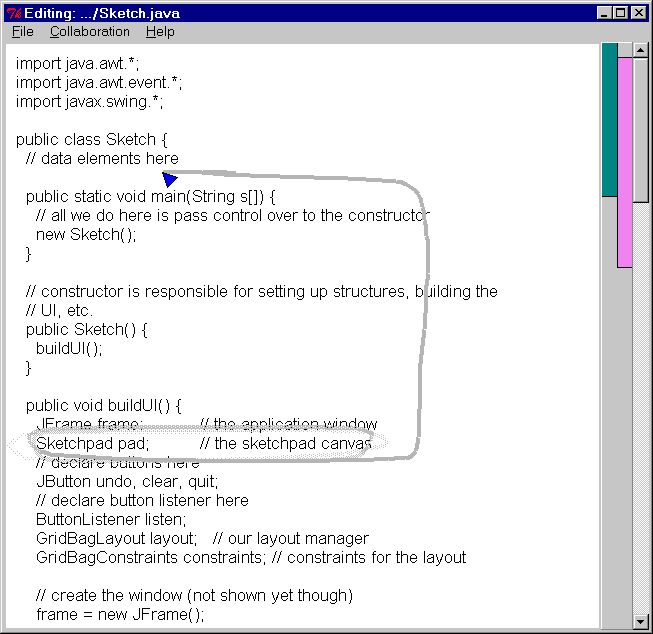
Figure 3. Persistent gesture showing where a line of code should be moved.
User Testing and Feedback
The two shared-workspace applications shown above, a puzzle-builder and a code editor, were informally tested with pairs and trios of users. A total of nine people participated in the evaluations. People used the systems in the same room, and so could talk normally but could not see each others’ screens. Participants were shown the systems with and without persistent gestures, although they spent most of their time working with the feature turned on. The goals of the evaluation were:
For the most part, participants found the telepointer trails useful in some circumstances, but not to be a major factor in completing their tasks. Persistent gestures were found more useful in the shared editor than in the tangram application; however, none of the participants found the trails to be an annoyance in either system. The most frequent comment about using the trails was that they helped to make indicating more precise—particularly in the code editor, where the plain telepointers were not seen as exact enough. When trails were added, they helped indicate a particular region of code more clearly. A few participants also said that paths were easier to see with the telepointer trails turned on (e.g. Figure 2), and one person made extensive use of persistence, even drawing out the positions of the tangram pieces (e.g. Figure 3).
The number of times that persistent gestures were used, however, was small in relation to the total amount of interaction. For example, in the tangram application, where objects are different shapes and colours, people were quite capable of indicating objects through language. This was not surprising, but it does suggest that the persistence technique needs to be carefully evaluated since it takes up both computational and human attentional resources. One user proposed that the trails be made visible only when the gesturer (rather than the viewer) holds down a mouse or keyboard button. This would be similar in effect to people raising their voices when they wanted to be sure of being heard.
A final observation is that people seemed to take more care in gesturing when their gestures were persistent. This may have happened because people were evaluating a gesturing tool; however, several participants also stated that once they realized that their gestures were being drawn on the other person’s screen, they tried thereafter to provide them with better, more understandable gestures. A related issue is that it people found it difficult to gesture precisely with a mouse; one participant said that it would be easier to make use of persistent gestures with a stylus pointing device.
LOCATION TRACKING
A second application of the idea of traces is location tracking—showing where a person has worked in the shared workspace by recording and visualizing the movement of their cursor and viewport. Location is a strong clue about activity, and seeing location history can answer questions about where changes have been made, how much of a task has been completed, and whether or not others have altered previous work. These questions are common both in asynchronous collaboration and in real-time work where people move between individual and shared focus.
Artists often show the path that a person has taken through a scene. For example, Minard's depiction of Napoleon's 1915 March on Moscow (e.g. [20]) visualizes the route taken by the French armies; and maps of the world frequently show the paths of explorers’ major voyages. On a smaller scale, the same technique can be used to help groupware collaborators keep track of where others have been in the workspace. Again, the technique is closely related to the idea of read wear [11], but is related to the person’s interaction with the space, rather than their interaction with the artifacts in the space.
Figure 4 shows an implementation of location tracks in a tree-browsing application. The inset window is a radar view—a miniature representation of the entire workspace that shows each person’s viewport as a coloured rectangle (e.g. [17]). Radar views are a natural place to show location histories, since they show the entire workspace at once. The system records people’s locations as they move their viewport to see different parts of the workspace in detail. Once the record is made, the trail can be visualized, giving others an idea of where people have been. The trail in the figure is a line that follows the middle of the viewport rectangle; in this illustration, the person has moved extensively around the left side of the workspace, but not at all around the right side.
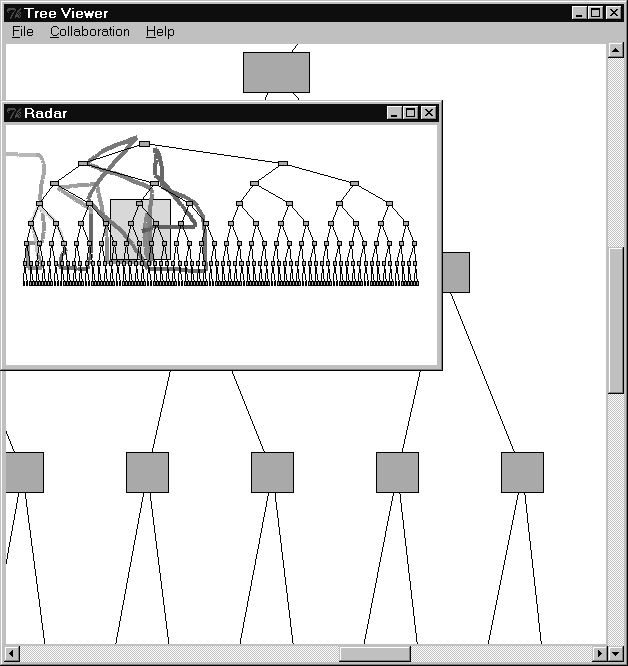
Figure 4. Location track in a radar view. The trail shows the path of the viewport during the session; the person who made this trail worked only on the left side of the tree.
As with telepointer trails, the track gradually fades over time to indicate relative time differences—however, the fading takes much longer than for a persistent gesture. In the application shown here, the trail can be set to fade out over a period of hours or even days.
Different visualizations of location trails provide different information. The version in Figure 4 shows the movement of the viewport as a line, and so accentuates the path taken by the person in the workspace. However, since it does not visualize the full extents of the viewport rectangle, it does not show exactly which parts of the workspace were contained inside the viewport. Figure 5 shows an alternate visualization that shows a person’s overall coverage of the workspace. In the figure, fading has been turned off completely.
User Testing and Feedback
The tree viewer application has been shown to several people to gather design feedback. A prerecorded location track was shown to people when they first started the system, and they also viewed their own track as it was being created. Participants immediately understood the visualization, and all thought that it could be a valuable tool in a shared workspace system. People particularly liked the idea of seeing where another person had worked during asynchronous collaboration. However, people also raised several issues that affect the use of the technique:
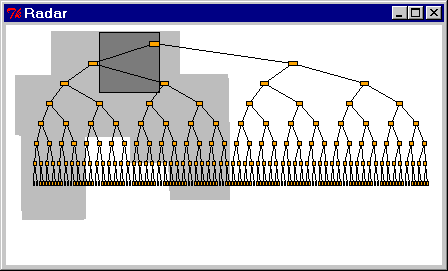
Figure 5. Location track showing viewport coverage rather than viewport path.
RELATED RESEARCH
The Traces project has connections to several prior areas of research, including versioning and revision systems, interaction histories, awareness of change, hypertext trails, and annotation in collaborative editing.
The idea of recording interaction histories has been around since Bush wrote about trails through document space in the Memex [2], and variations on the theme have been proposed several times (e.g. [4,14]). In terms of modern CSCW systems, though, it was Hill and Hollan who pioneered the idea "that all interaction histories should be recorded permanently, event by event, and made accessible for later redisplay by interface objects" ([11], p. 7). They demonstrated several prototypes and mockups, including: scrollbars that indicate which lines of text have been edited (and how much) and which lines have been viewed most often; spreadsheet cells that darken the more they have been edited; and menus that show how frequently each item has been chosen. Other projects have followed this lead, and have visualized document revisions (e.g. [5]), or shown various kinds of paths across documents on the WWW (e.g. [10,21]).
However, from the perspective of a collaborator trying to stay aware of another person in the workspace, not all events in the interaction history are the same [6]. In particular, there are two different mechanisms by which people gather information about others in the real world—one involving artifacts, and the other involving people. Artifacts inform others by the mechanism of feedthrough, which is the information "given off" by artifacts as they are manipulated [3]. People, on the other hand, inform others through the motion, position, and location of their bodies in the space. This is called consequential communication by Segal [16]—information transfer that emerges as a consequence of a person's activity within an environment.
With this distinction in mind, it appears that most earlier work on interaction histories has concentrated on feedthrough and artifact-based history. Traces explores the interaction history that people’s bodies (or embodiments) create, and this leads to some different kinds of visualizations and uses of the history. For example, mouse-cursor movement (and so gestural communication) cannot be summed up by changing the representation of an artifact; only a body-centred history can record the necessary information. In addition, artifact-centric approaches cannot completely track location in workspaces that are sparsely populated (such as the tree viewer workspace in Figure 4). However, the two approaches work well together in the real world, and both should be considered in computational shared workspaces.
More specifically in terms of persistent gestures, there is considerable work on annotation of documents (e.g. [9]). This work concentrates primarily on asynchronous editing, but is strongly related in that persistent gestures are often very similar to editing marks, but are not permanent. Finally, I note that a kind of trace-telepointer has already existed for some time: the mouse control panel on some laptop computers allows the user to add a trail of pointers, in order to better track the cursor on screens with slow refresh rates. This is a similar problem to the one described above, and underlines the importance of adequate perceptual information for using and interpreting pointer motion.
FUTURE WORK
Although initial user feedback shows that the idea of traces holds promise for improving interaction in certain collaborative settings, the research hypothesis (that traces improve awareness, communication, and coordination) has not been adequately tested. A larger, more structured, and more realistic evaluation will be carried out using the shared code editor shown in Figure 3. The motivation for the study is that an increasing number of computer science students work on programming assignments at home, so remote help and advising is being considered. The study will look at whether persistent gestures improve the clarity of gestural communication and reduce the amount of verbal discussion required.
The other direction for the Traces project is in improving existing systems based on initial feedback and building new kinds of traces. In particular, I am interested in whether and how persistence can be applied to pointing and gesturing in three-dimensional environments (e.g. [13]). Also, more work is still needed to refine the visual appearance of the traces, work that will hopefully be carried out in collaboration with cartoonists and animators.
CONCLUSION
This paper has introduced the idea of traces, which are visualizations of a person’s actions and interactions with a shared workspace. Traces are intended to make actions and activities more noticeable and easier for others to see. Two different applications of the idea were presented: persistent gestures, and location tracks. Although more evaluation work is needed, these techniques show promise for improving gestural communication, and task coordination in asynchronous work.
ACKNOWLEDGMENTS
This research was supported by the Natural Sciences and Engineering Research Council of Canada.
SOFTWARE AVAILABILITY
Several of the systems shown in this paper were built with Groupkit, a free groupware toolkit that uses Tcl/Tk. Groupkit is available from:
www.cpsc.ucalgary.ca/projects/groupkit/
The applications themselves (the tangram puzzle builder, the shared code editor, and the tree viewer) will be made available from:
www.cs.usask.ca/faculty/gutwin/traces/
REFERENCES